
For the best experience, switch to desktop mode
You can continue on mobile, but some layouts and details may not display optimally.
Amazon By CedCommerce
UI UX Design
Feature is live
Multiple Location Inventory (MLI)
Multiple Location Inventory (MLI)
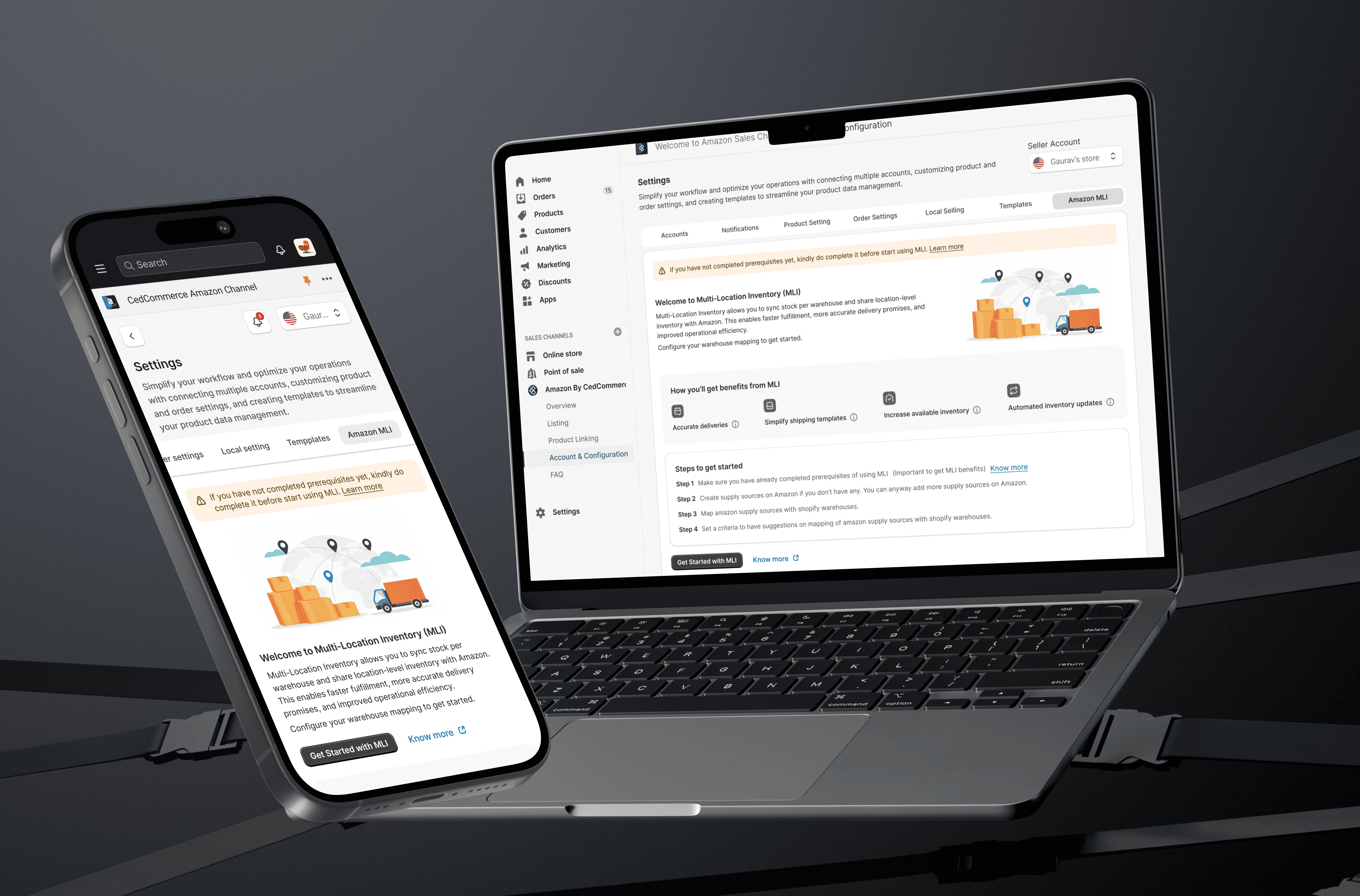
Manage inventory across multiple warehouses and let Amazon calculate delivery from the closest location automatically.
Make every order ship from the right location.
The Brief
The Brief
Managing inventory across multiple locations shouldn't feel like solving a puzzle. As sellers expanded across warehouses and stores, keeping inventory synchronized became increasingly complex and error-prone. Multi Location Inventory (MLI) simplifies inventory management by enabling merchants to manage stock across multiple locations, improve inventory accuracy, and streamline fulfillment from a single, intuitive interface.
Managing inventory across multiple locations shouldn't feel like solving a puzzle. As sellers expanded across warehouses and stores, keeping inventory synchronized became increasingly complex and error-prone. Multi Location Inventory (MLI) simplifies inventory management by enabling merchants to manage stock across multiple locations, improve inventory accuracy, and streamline fulfillment from a single, intuitive interface.
Meet Sanjay Surve who runs a growing D2C brand selling sarees across India.
To manage his sales across platforms,Sanjay uses CedCommerce to connect his Shopify store with Amazon.




The Merchant Behind the System
His current setup

Shopify is his primary inventory management system
Shopify is his primary inventory management system
Products are synced to Amazon using CedCommerce
Products are synced to Amazon using CedCommerce

Orders from Amazon are processed and fulfilled by him (FBM)
Orders from Amazon are processed and fulfilled by him (FBM)

Inventory is maintained across multiple warehouses
Inventory is maintained across multiple warehouses
To support faster dispatch and better stock control, Arjun has,
Mumbai warehouse
Delhi
warehouse
Bangalorewarehouse
Although Sanjay maintained inventory across multiple warehouses,
Amazon did not understand this structure.



500 Units
1500 Units
500 Units
500 Units
Through CedCommerce, inventory was synced as a single total value.
Amazon only saw, “Total stock available: 500 + 500 + 500 = 1500 units.”
Amazon did not know
Where the stock was located
Which warehouse was closer to the buyer
Which location should fulfil the order
Why This Was a Problem

Delivery estimates were not optimized by region

Orders were not always fulfilled from the nearest warehouse
Multi-warehouse advantage was lost
To improve delivery accuracy for sellers, Amazon launched Multi-Location Inventory (MLI).
Instead of accepting just a single total stock number, Amazon could now receive inventory per warehouse.
WHY
MLI MATTERED

Customers see faster delivery timelines

Orders ship from the closest warehouse

Shipping costs reduce

Seller performance metrics improve
“On paper, this was exactly what Sanjay needed. But supporting MLI inside CedCommerce wasn’t just about adding a new setting. It meant redesigning how two systems communicate safely, clearly, and reliably”

Gaurav C
The Integration Gap


Two Systems. Two Languages.
Structure inventory differently
They cant recognise each others
Addresses could be formatted differently
Some had logical warehouse splits
They cant recognise each others
If mapping was incorrect:
Inventory could sync to the wrong location
Delivery estimates could become inaccurate
Orders could be fulfilled inefficiently
Seller trust in the system could break
I designed a structured setup experience that supports safe and flexible mapping, and prevents configuration errors.
Instead of manual guesswork, the system guides merchants through a controlled, step-by-step linking process.

Learn more about Amazon by CedCommerce.
Need Help? Get Support or Book a Call
Welcome to Amazon Sales Channel / Account & Configuration
Settings
Simplify your workflow and optimize your operations with connecting multiple accounts, customizing product and order settings, and creating templates to streamline your product data management.
Seller Account

Gaurav’s store
Accounts
Notifications
Product Setting
Order Settings
Local Selling
Templates
Amazon MLI
If you have not completed prerequisites yet, kindly do complete it before start using MLI. Learn more
Welcome to Multi-Location Inventory (MLI)
Multi-Location Inventory allows you to sync stock per warehouse and share location-level inventory with Amazon. This enables faster fulfillment, more accurate delivery promises, and improved operational efficiency.
Configure your warehouse mapping to get started.

How you’ll get benefits from MLI
Accurate deliveries
Simplify shipping templates
Increase available inventory
Automated inventory updates
Steps to get started
Step 1
Make sure you have already completed prerequisites of using MLI
(Important to get MLI benefits)
Know more
Step 2
Create supply sources on Amazon if you don't have any. You can anyway add more supply sources on Amazon.
Step 3
Map amazon supply sources with shopify warehouses.
Step 4
Set a criteria to have suggestions on mapping of amazon supply sources with shopify warehouses.
Get Started with MLI
Know more
Home
Orders
15
Products
Customers
Analytics
Marketing
Discounts
Apps
Sales channels
Online store
Point of sale
Amazon By CedCommerce
Overview
Listing
Product Linking
Account & Configuration
FAQ
Settings
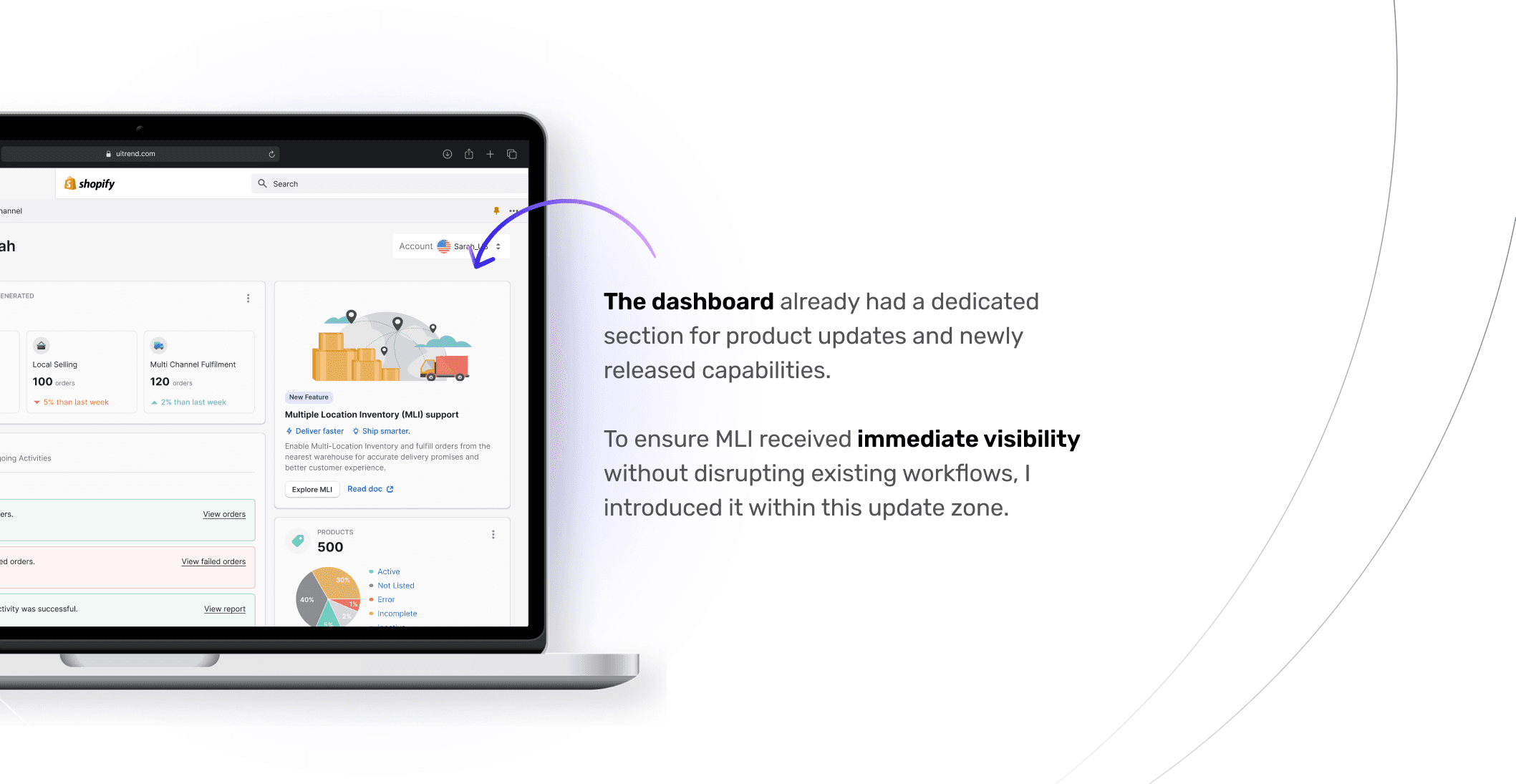
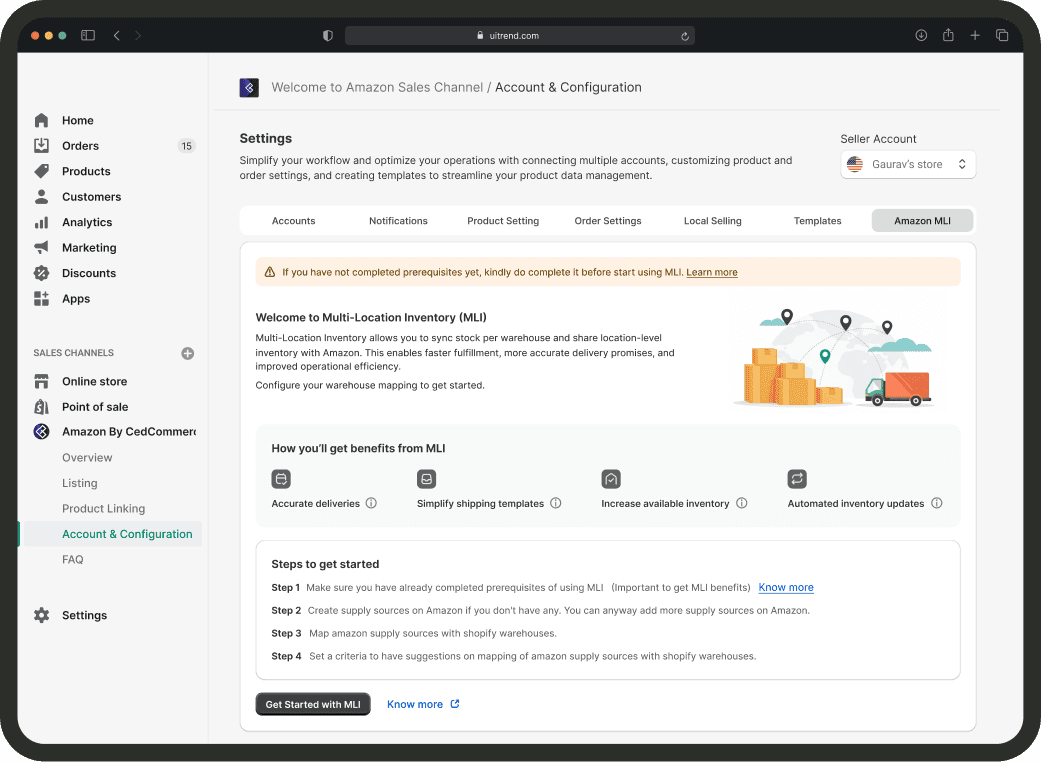
After clicking the dashboard card, merchants land on a dedicated MLI overview screen.
This screen serves three purposes:
Explains what MLI does in simple terms
Highlights tangible business benefits
Outlines the setup steps clearly

uitrend.com

Sarah Carter
Home
Orders
Products
Customers
Finances
Analytics
Marketing
Discounts
Sales channels
Online Store
CedCommerce Amazon Channel
Overview
Listings
Sales
Settings
FAQ
Settings
Search
GC
Gaurav Chindarkar

CedCommerce Amazon Channel
Welcome, Sarah
Account

Sarah_US
Need Help? Get Support or Book a Call

TOTAL revenue generated
$ 2,300

Online Selling
800
orders
20% than last week

Local Selling
100
orders
5% than last week

Multi Channel Fulfilment
120
orders
2% than last week
Notifications
Ongoing Activities
Today
10 unchecked orders.
2 minutes ago
View orders
10 unchecked failed orders.
30 minutes ago
View failed orders
Product upload activity was successful.
One hour ago
View report
Yesterday
Product upload activity was successful.
Tuesday, 23:00 hrs
View report
Product upload activity was successful.
Tuesday, 17:30 hrs
View report
View all notifications

New Feature
Multiple Location Inventory (MLI) support
Deliver faster
Ship smarter.
Enable Multi-Location Inventory and fulfill orders from the nearest warehouse for accurate delivery promises and better customer experience.
Explore MLI
Read doc

products
500
30%
40%
5%
2%
1%
Active
Not Listed
Error
Incomplete
Inactive
BEST SELLING PRODUCTS
1.

Collection Eye Love Eyeshadow Palette...
4K+ bought in past month
4.5 Stars
2.

Microsmooth Foundation...
3.2K+ bought in past month
4.7 Stars
3.

Waterproof Eye Makeup...
1.5K+ bought in past month
4.5 Stars
4.

Microsmooth Foundation...
1K+ bought in past month
4.7 Stars
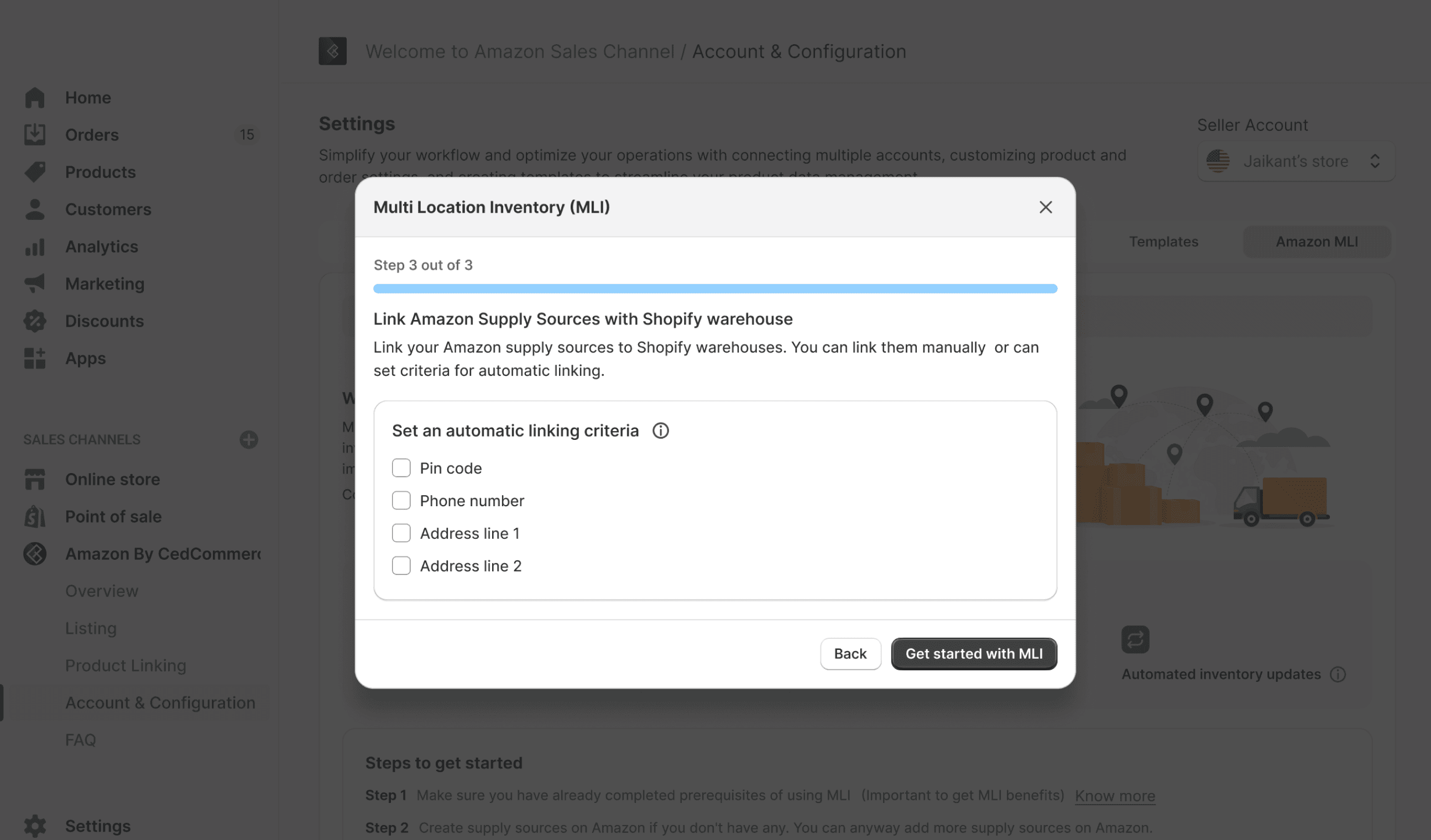
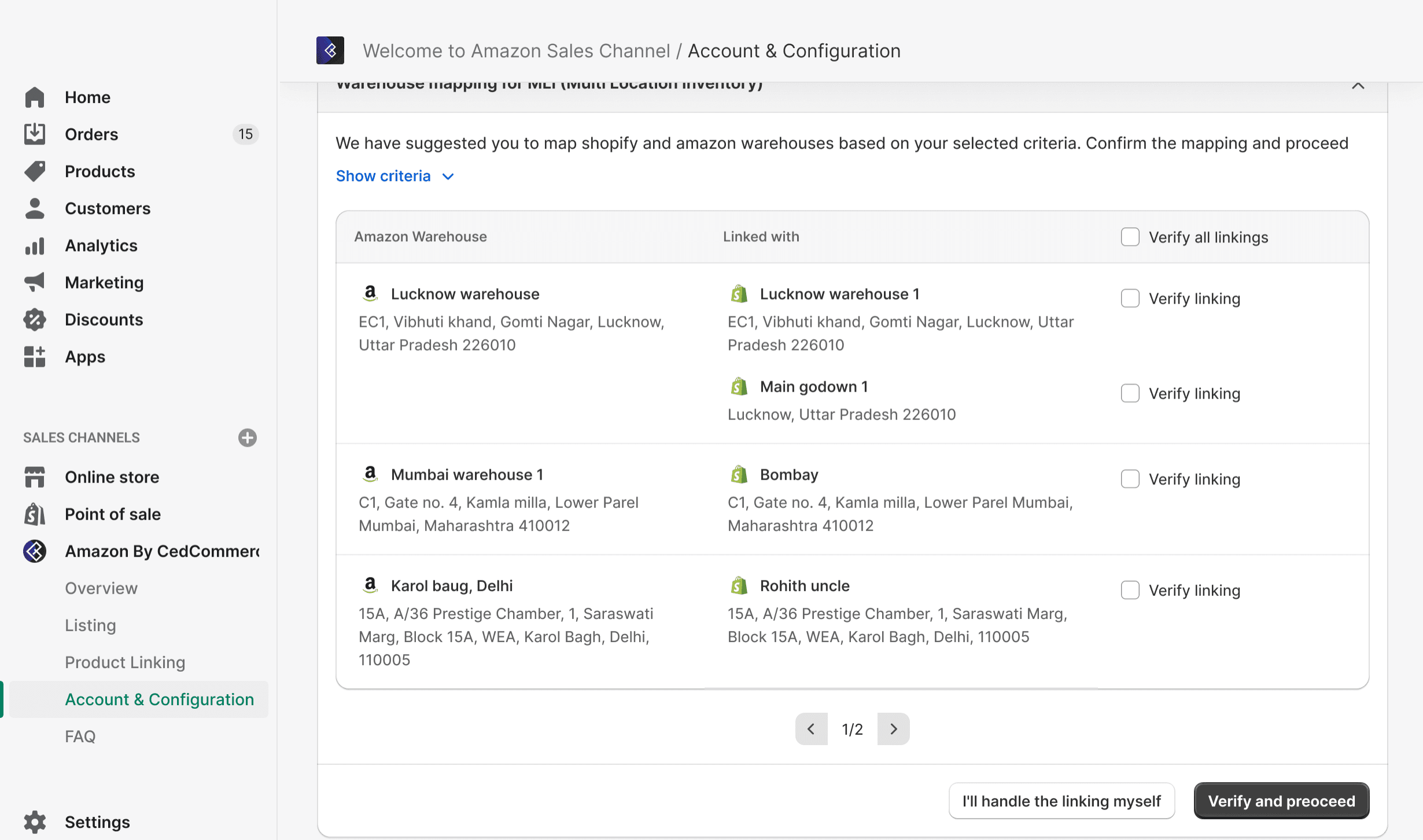
During setup, merchants are required to link Amazon supply sources with Shopify warehouses.
Warehouse names may differ, addresses may vary in format, and manual mapping can become repetitive for sellers with multiple locations.
So here, merchants can choose matching attributes as shown, and based on the selected criteria, the system suggests mappings automatically.
Based on the selected criteria, the system automatically generates suggested mappings between Amazon supply sources and Shopify warehouses.
But still, I introduced a verification layer.
Each suggested mapping requires explicit confirmation before proceeding.

uitrend.com
uitrend.com
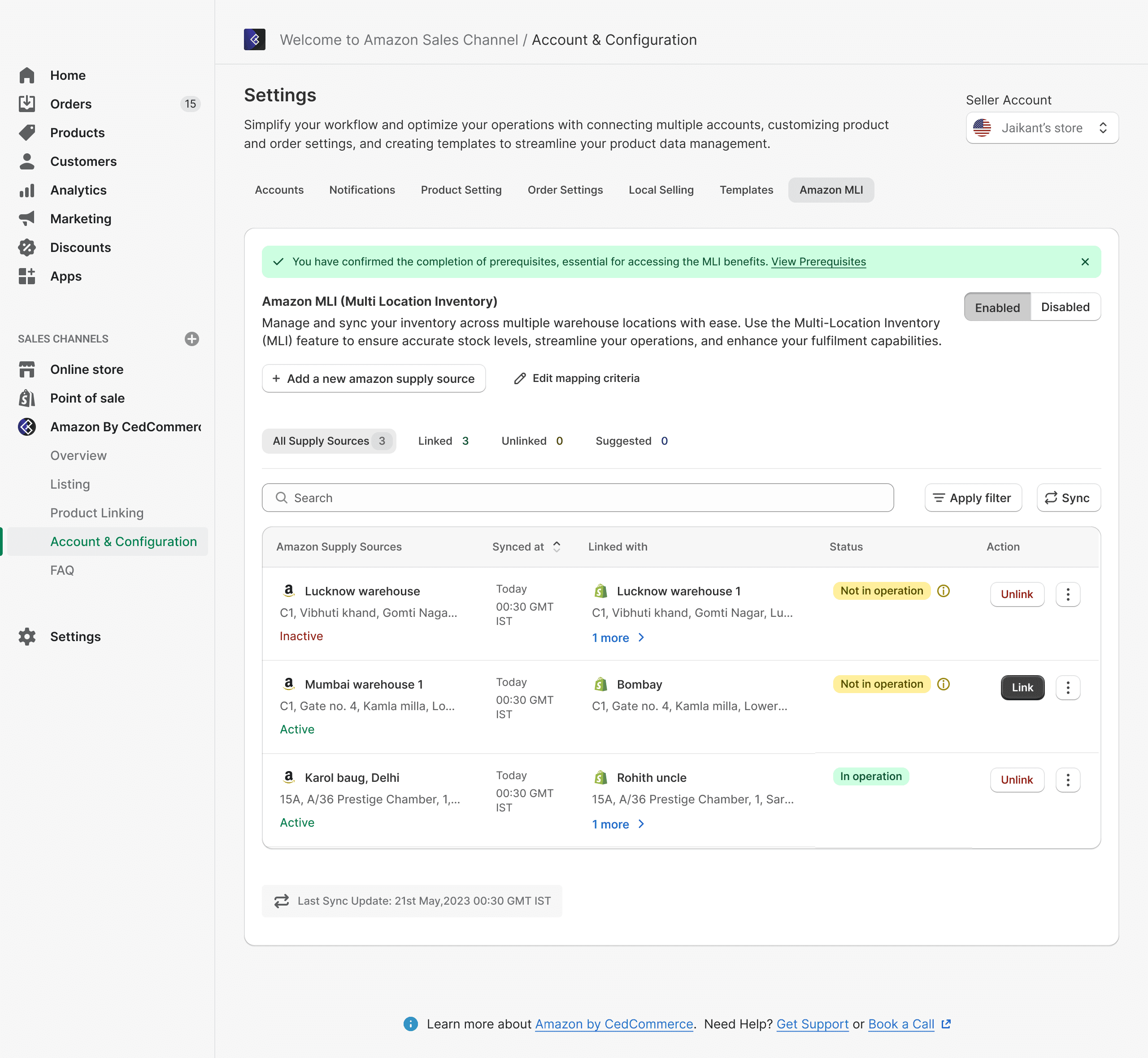
Once setup is complete, merchants land on a centralised MLI management dashboard.
This screen provides complete visibility into all Amazon supply sources, Linked Shopify warehouses, Operational status, Sync history and Linking actions (Link/Unlink)
The goal was to create a screen that:
Makes warehouse relationships transparent
Surfaces operational states clearly (Active / Inactive / Not in operation)
Enables quick corrective actions
Supports scale as more supply sources are added

uitrend.com

uitrend.com
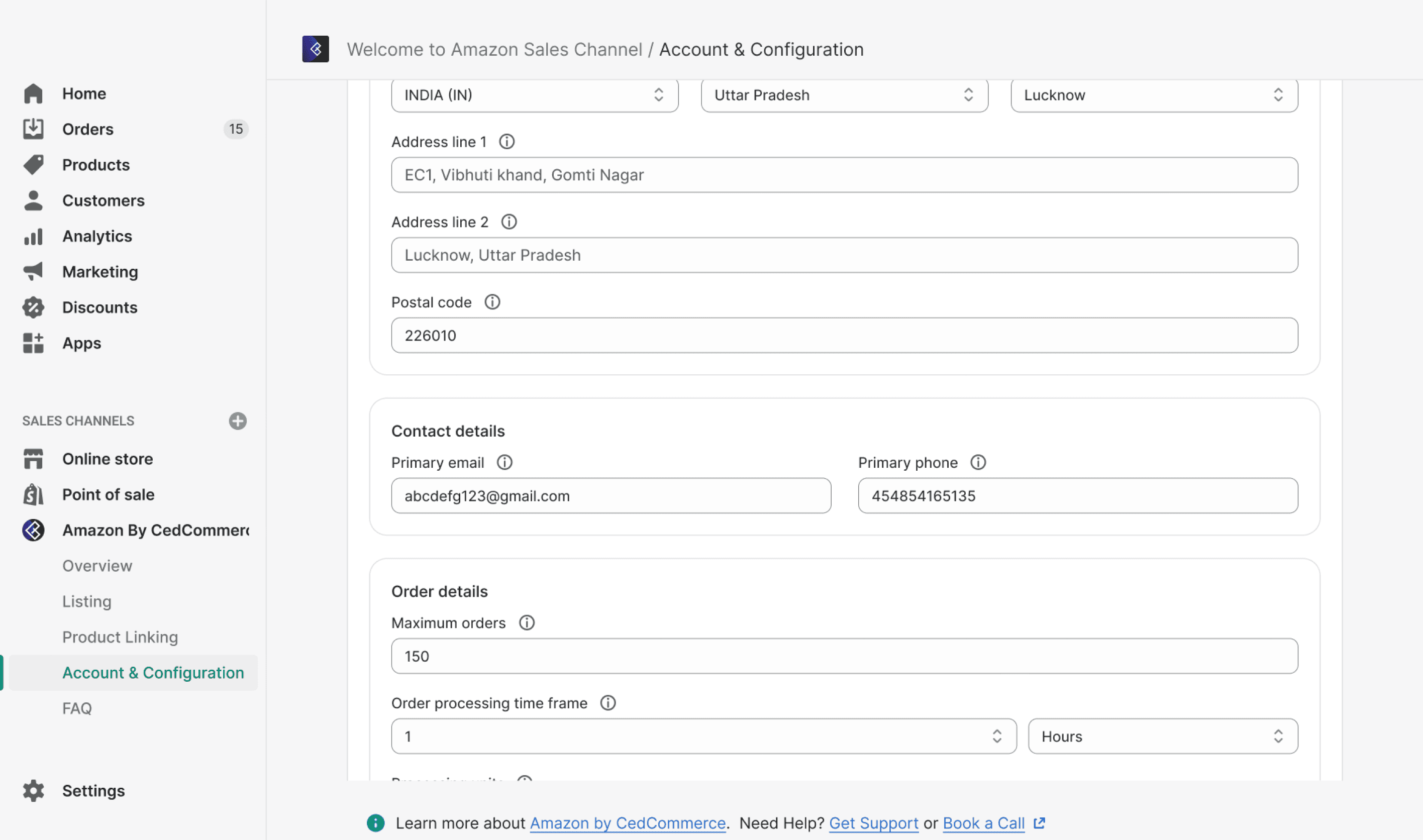
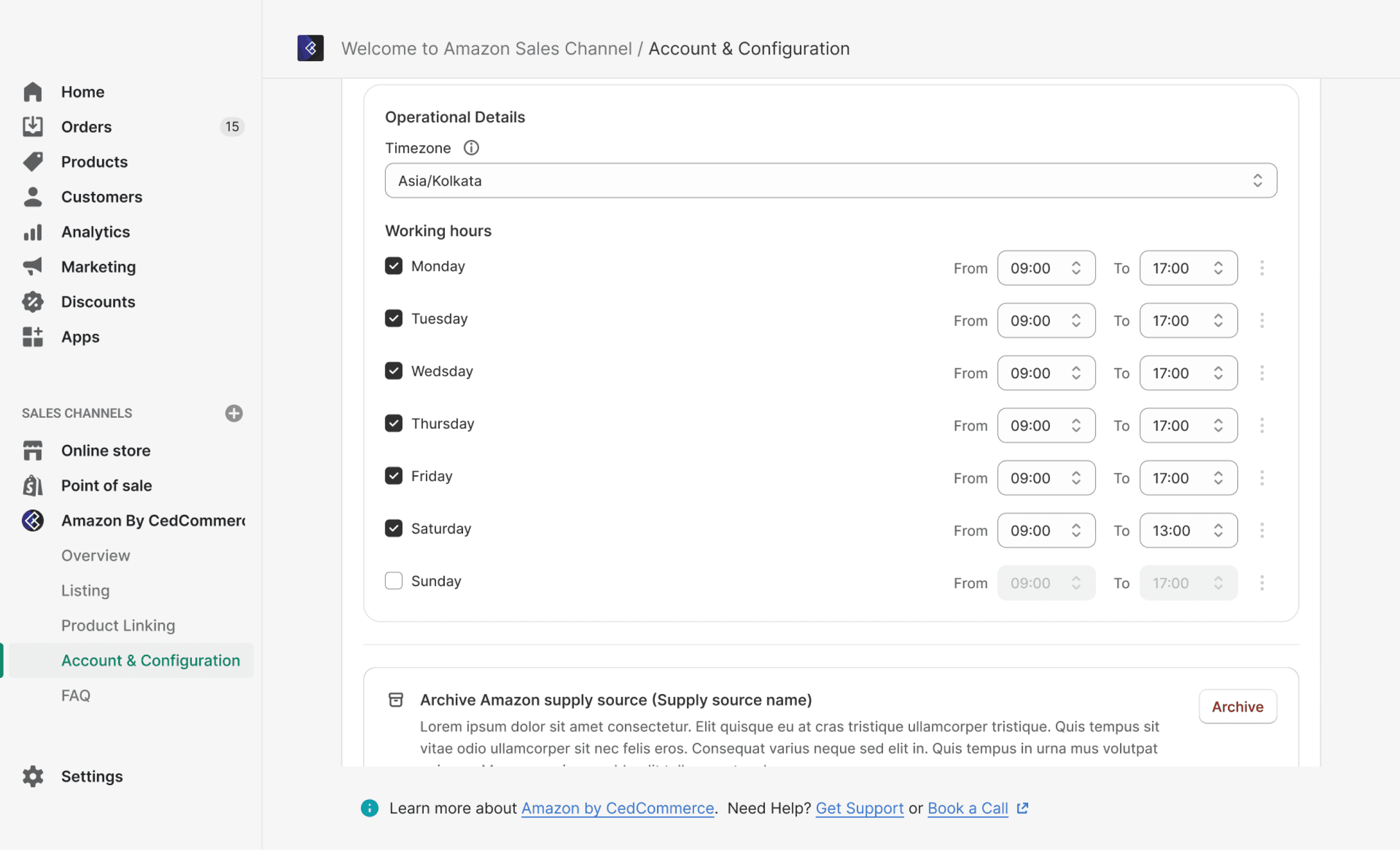
Merchants can easily add a new supply source or edit an existing one as their operations evolve. Each supply source captures more than just a name defines how fulfilment actually works.
Impact & Outcomes
By enabling Multi-Location Inventory (MLI), merchants can now accurately map their Shopify warehouses with Amazon supply sources, allowing inventory to be managed at a location level rather than as a single stock pool.
Impact on Merchants

Merchants gain greater control and visibility over their inventory network. Orders can now be fulfilled from the most appropriate warehouse.

Manage inventory more accurately across multiple locations
Manage inventory more accurately across multiple locations
Reduce warehouse mapping mistakes
Reduce warehouse mapping mistakes
Improve operational efficiency
Improve operational efficiency
Scale warehouse operations with confidence
Scale warehouse operations with confidence
Impact on Customers

With inventory available at the warehouse level, Amazon can make smarter fulfilment decisions based on stock location.
Faster delivery promises
More accurate delivery estimates
Improved order fulfilment experience
Impact on the Business

MLI strengthens CedCommerce's integration capabilities by supporting Amazon's latest fulfilment requirements.
Strengthens CedCommerce's position as a reliable multichannel commerce partner
Improves merchant trust in the platform
Creates a scalable foundation for future inventory management capabilities

“What appeared to be a simple integration feature was actually a complex inventory-mapping challenge. By designing a structured, guided, and transparent setup experience, we transformed a technically complex workflow into one that merchants could complete with confidence.”
“What appeared to be a simple integration feature was actually a complex inventory-mapping challenge. By designing a structured, guided, and transparent setup experience, we transformed a technically complex workflow into one that merchants could complete with confidence.”
Thank you!
Open to feedback, critique, and discussion on scaling this system further.