
Live
Full time role
50+ screens
Continuously Evolving
Dragonfly
An internal AI platform that teams could actually trust.
From hours of paperwork to minutes of productivity

The Brief
The Brief
The Brief
Every day, employees spent valuable time creating documents, comparing files, and searching for information tasks that AI could complete in minutes. Dragonfly was built to bridge that gap by bringing powerful AI tools into one centralized platform. The challenge was not just integrating AI, but designing an experience that felt simple, reliable, and easy to adopt for everyday work across the organization.
Every day, employees spent valuable time creating documents, comparing files, and searching for information tasks that AI could complete in minutes. Dragonfly was built to bridge that gap by bringing powerful AI tools into one centralized platform. The challenge was not just integrating AI, but designing an experience that felt simple, reliable, and easy to adopt for everyday work across the organization.

Every product has a story.
Ours started with frustration!
Frustration was happening across teams every day, quietly, and almost unnoticed.

BRDs taking hours…sometimes days.
BRDs taking hours…sometimes days.

60 page reports. Read manually. Before meetings.
60 page reports. Read manually. Before meetings.

Hundreds of resumes. Still unsure about the shortlist
Hundreds of resumes. Still unsure about the shortlist

But a few turned to external AI tools to speed things up, but that meant putting
sensitive internal data at risk
But a few turned to external AI tools to speed things up, but that meant putting
sensitive internal data at risk
But a few turned to external AI tools to speed things up, but that meant putting
sensitive internal data at risk
While AI was making work faster everywhere else, our teams were still relying on manual processes limited by strict data security constraints.
While AI was making work faster everywhere else, our teams were still relying on manual processes limited by strict data security constraints.
While AI was making work faster everywhere else, our teams were still relying on manual processes limited by strict data security constraints.


- HOD (Innovation Department)
- HOD (Innovation Department)
Instead of restricting AI usage, Let’s enable it…but on our own terms!
Instead of restricting AI usage, Let’s enable it…but on our own terms!

To turn this idea into reality,
a small but sharp team was put together
To turn this idea into reality,
a small but sharp team was put together

Designer (Me)
Designer (Me)
Designer (Me)
Who converts research insights into information architecture, user flows, and interaction design.
Who converts research insights into information architecture, user flows, and interaction design.
Who converts research insights into information architecture, user flows, and interaction design.

Product manager
Product manager
Product manager
Who defines product requirements, prioritises features, and aligns business, user, and technical goals.
Who defines product requirements, prioritises features, and aligns business, user, and technical goals.
Who defines product requirements, prioritises features, and aligns business, user, and technical goals.

Frontend Developer
Frontend Developer
Frontend Developer
Who develops dynamic interfaces, manages state, and integrates UI with backend services.
Who develops dynamic interfaces, manages state, and integrates UI with backend services.
Who develops dynamic interfaces, manages state, and integrates UI with backend services.

Backend Developer
Backend Developer
Backend Developer
Who implements server side logic, AI API integrations, authentication, and token management systems.
Who implements server side logic, AI API integrations, authentication, and token management systems.
Who implements server side logic, AI API integrations, authentication, and token management systems.

As the sole designer on the project, I owned the end to end user experience. I translated research insights into clear user flows, interaction patterns, and intuitive interfaces.
I worked closely with the PM and developers to make sure the solutions were not just user friendly, but also aligned with business goals and technical constraints allowing me to contribute beyond just visual design.
As the sole designer on the project, I owned the end to end user experience. I translated research insights into clear user flows, interaction patterns, and intuitive interfaces.
I worked closely with the PM and developers to make sure the solutions were not just user friendly, but also aligned with business goals and technical constraints allowing me to contribute beyond just visual design.
And that’s when the Innovation Head introduced a pivotal idea
And that’s when the Innovation Head introduced a pivotal idea
We followed an agile and highly collaborative way of working,
where design, development, and product decisions evolved continuously rather than in a strict linear process.
We followed an agile and highly collaborative way of working,
where design, development, and product decisions evolved continuously rather than in a strict linear process.
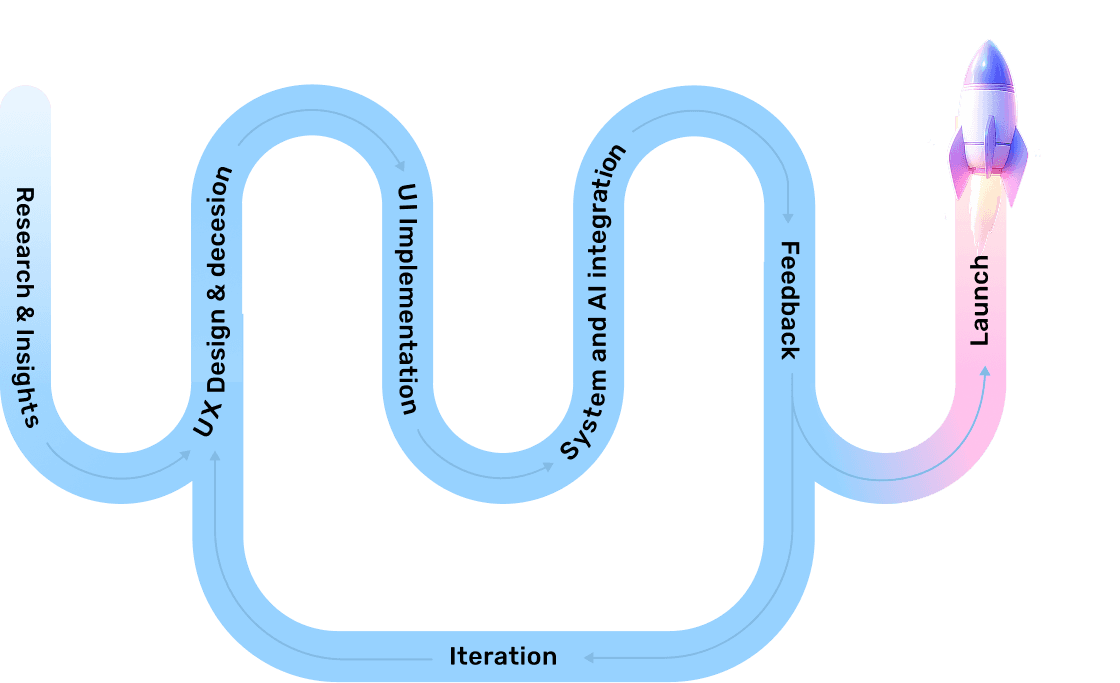

User Insights
User Insights

Design Decisions
Design Decisions
I actively participated in user interviews along with the PM to understand real usage patterns and challenges.
I actively participated in user interviews along with the PM to understand real usage patterns and challenges.

SET OBJECTIVE
SET OBJECTIVE


GOT INSIGHTS FROM USER INTERVIEWS
GOT INSIGHTS FROM USER INTERVIEWS

USE INSIGHTS FOR DESIGNING
USE INSIGHTS FOR DESIGNING
What We Heard During Discovery
After conducting user interviews and user discussions across departments, I started noticing some common problems and repeated patterns.
Document heavy workflows
Employees spent significant time reading, summarising, and comparing lengthy documents.
Growing AI Adoption
Teams were already exploring AI tools to accelerate repetitive tasks.
Security Concerns
Employees were interested in AI but hesitant to use external tools for confidential information.
Manual Processes
Tasks such as BRD creation, translation, and document analysis required considerable manual effort.
Need for Faster Outcomes
Users cared less about technology and more about completing work quickly.
As interview data was synthesized, three recurring patterns became visible





Speed was becoming a workplace expectation
Speed was becoming a workplace expectation

Users wanted AI assistance, while stakeholders needed safeguards around organisational data.
Users wanted AI assistance, while stakeholders needed safeguards around organisational data.

Many teams faced common document-related problems that could be solved through AI.
Many teams faced common document-related problems that could be solved through AI.


What users want?
“Don't want to learn another tool”
“Tool that would reduce manual efforts of documentation”
“Alternative to ChatGPT, Gemini, Copilot”
“Want Flexibility, Not Rigid Workflow”
Total 60+ use cases were collected from all departmemts
What business want?
Assurance that confidential information never leaves the organization.
Wanted visibility into how AI was being used.
AI usage had to remain measurable and scalable.
But 60+ use cases is too much, we have to reduce it to 25
This created a fundamental design challenge
This created a fundamental design challenge
How might we design an experience that feels simple and fast for users, while still meeting the organisation’s need for control, visibility, and accountability?
Building a Secure AI Ecosystem for Enterprise Teams
Building a Secure AI Ecosystem for Enterprise Teams
Dragonfly was envisioned as more than a collection of AI tools. The goal was to create a unified platform that enables teams to leverage AI securely, efficiently, and at scale.
Dragonfly was envisioned as more than a collection of AI tools. The goal was to create a unified platform that enables teams to leverage AI securely, efficiently, and at scale.
The platform was designed around four pillars

Security First
Security First
Protect sensitive business information from leaking.
Protect sensitive business information from leaking.

Modular Architecture
Modular Architecture
Different departments can access only relevant capabilities.
Different departments can access only relevant capabilities.

Governance & Visibility
Governance & Visibility
Track and control AI consumption.
Track and control AI consumption.

User Experience
User Experience
Deliver an intuitive experience that encourage adoption
Deliver an intuitive experience that encourage adoption
With clear direction in place, I began designing key modules iterating through multiple versions and refining them through continuous feedback.
This process helped shape a solution that balances user simplicity with business contro, leading to the final product “Drag-N-fly”

The following solution is adapted from real project experience. Certain details have been modified to maintain confidentiality.
The following solution is adapted from real project experience. Certain details have been modified to maintain confidentiality.
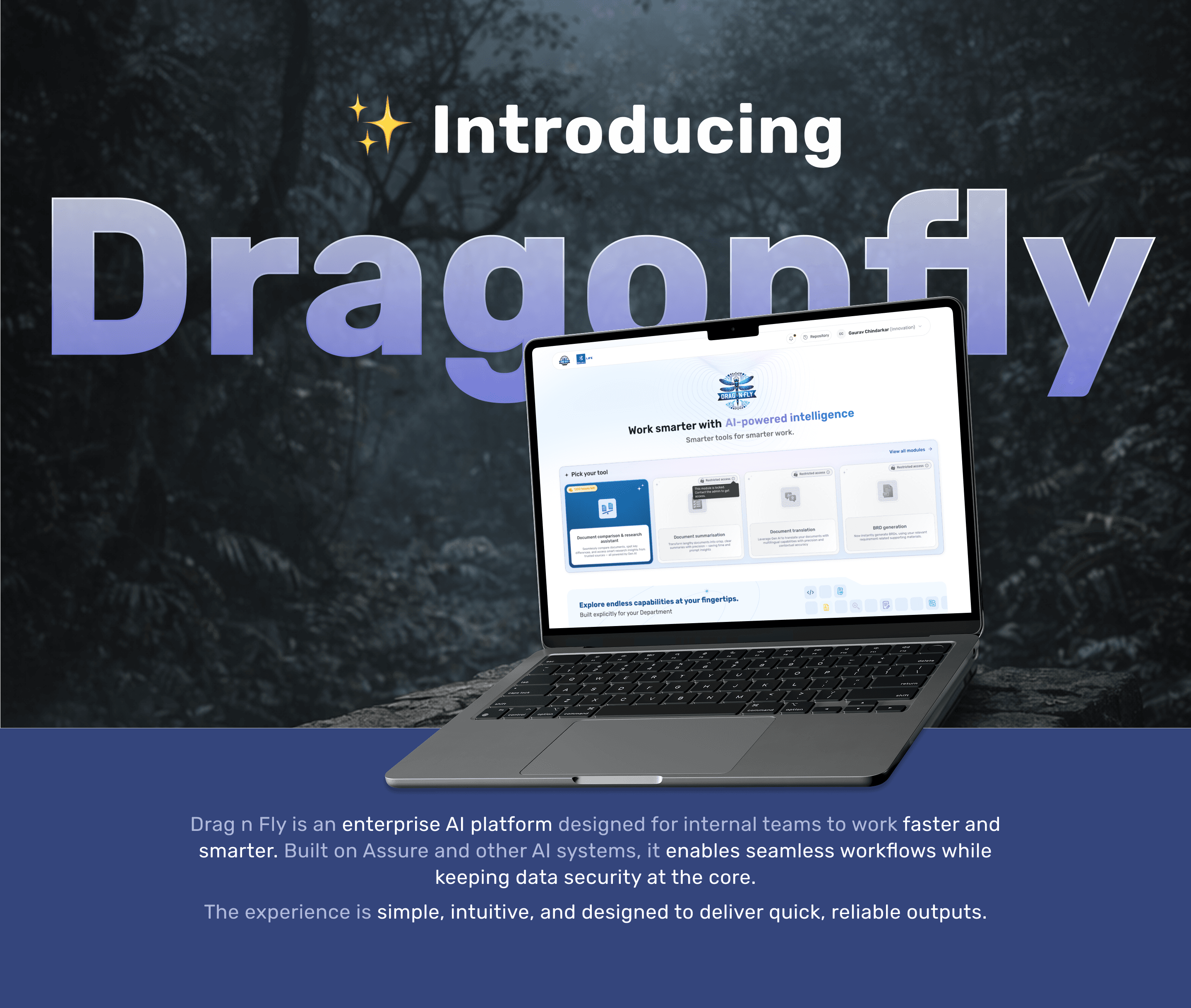
Let’s walk through the experience
Let’s walk through the experience
Let’s walk through the experience
how Drag n Fly works across key touchpoints.
how Drag n Fly works across key touchpoints.

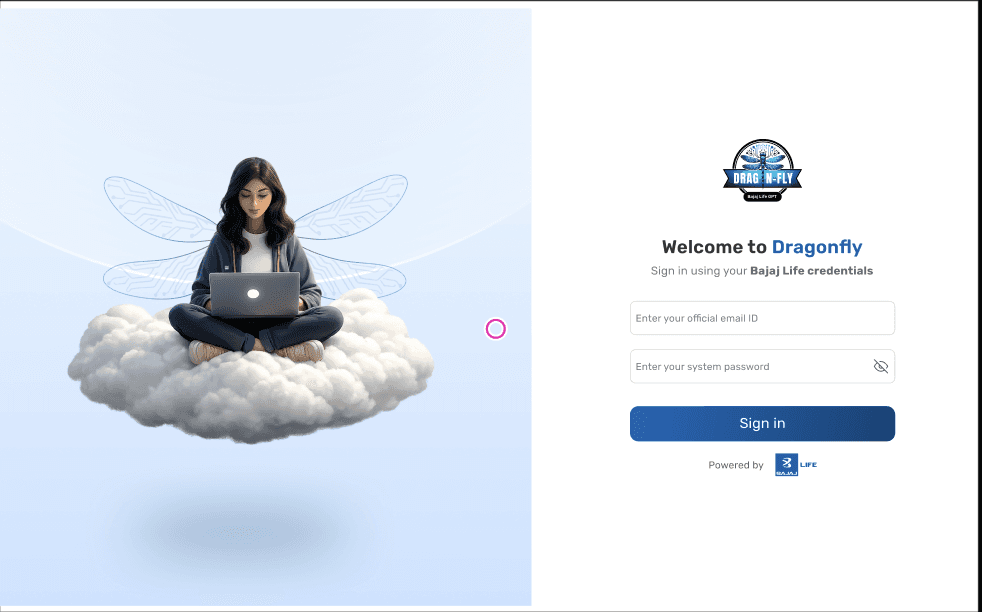
Unified login screen for everyone
Unified login screen for everyone
Unified login screen for everyone
user can login using official credentials.
user can login using official credentials.
user can login using official credentials.

The login experience is designed to be quick and frictionless by keeping only essential inputs and following a familiar pattern that requires no learning.
The login experience is designed to be quick and frictionless by keeping only essential inputs and following a familiar pattern that requires no learning.
The floating illustration adds a subtle sense of lightness, reflecting the idea that work feels easier with Drag n Fly
The floating illustration adds a subtle sense of lightness, reflecting the idea that work feels easier with Drag n Fly

Once the user logs in, they land on the home screen
Once the user logs in, they land on the home screen
The central hub of the platform!
The central hub of the platform!
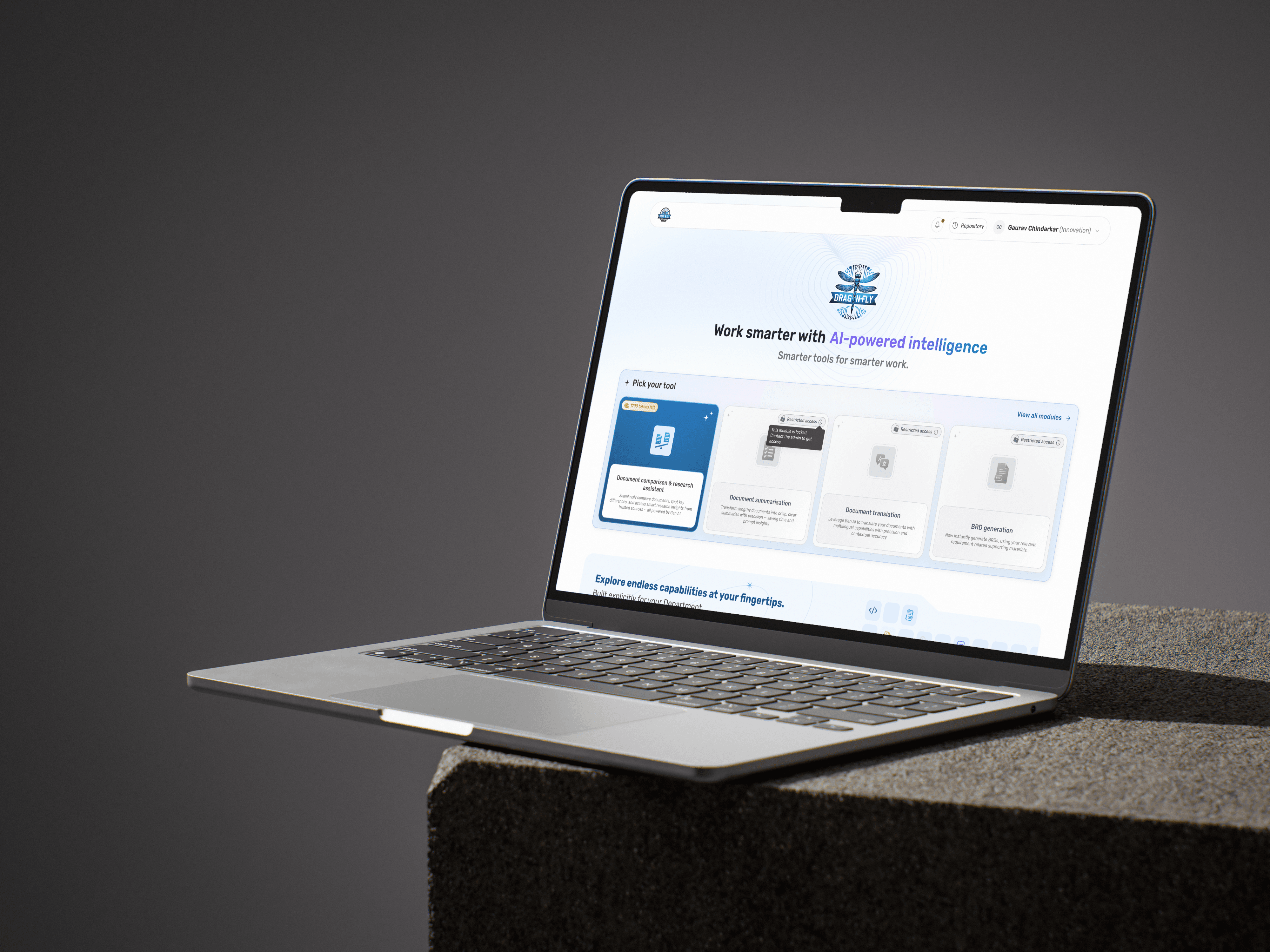
The goal here was to immediately guide users towards action, without overwhelming them. Instead of exposing everything at once, the Home screen introduces users to relevant tools (modules) based on their needs and access.
The goal here was to immediately guide users towards action, without overwhelming them. Instead of exposing everything at once, the Home screen introduces users to relevant tools (modules) based on their needs and access.
The goal here was to immediately guide users towards action, without overwhelming them. Instead of exposing everything at once, the Home screen introduces users to relevant tools (modules) based on their needs and access.

A subtle hover micro-interaction is introduced on accessible modules to signal interactivity, improving affordance and guiding user action.
A subtle hover micro-interaction is introduced on accessible modules to signal interactivity, improving affordance and guiding user action.
A subtle hover micro-interaction is introduced on accessible modules to signal interactivity, improving affordance and guiding user action.

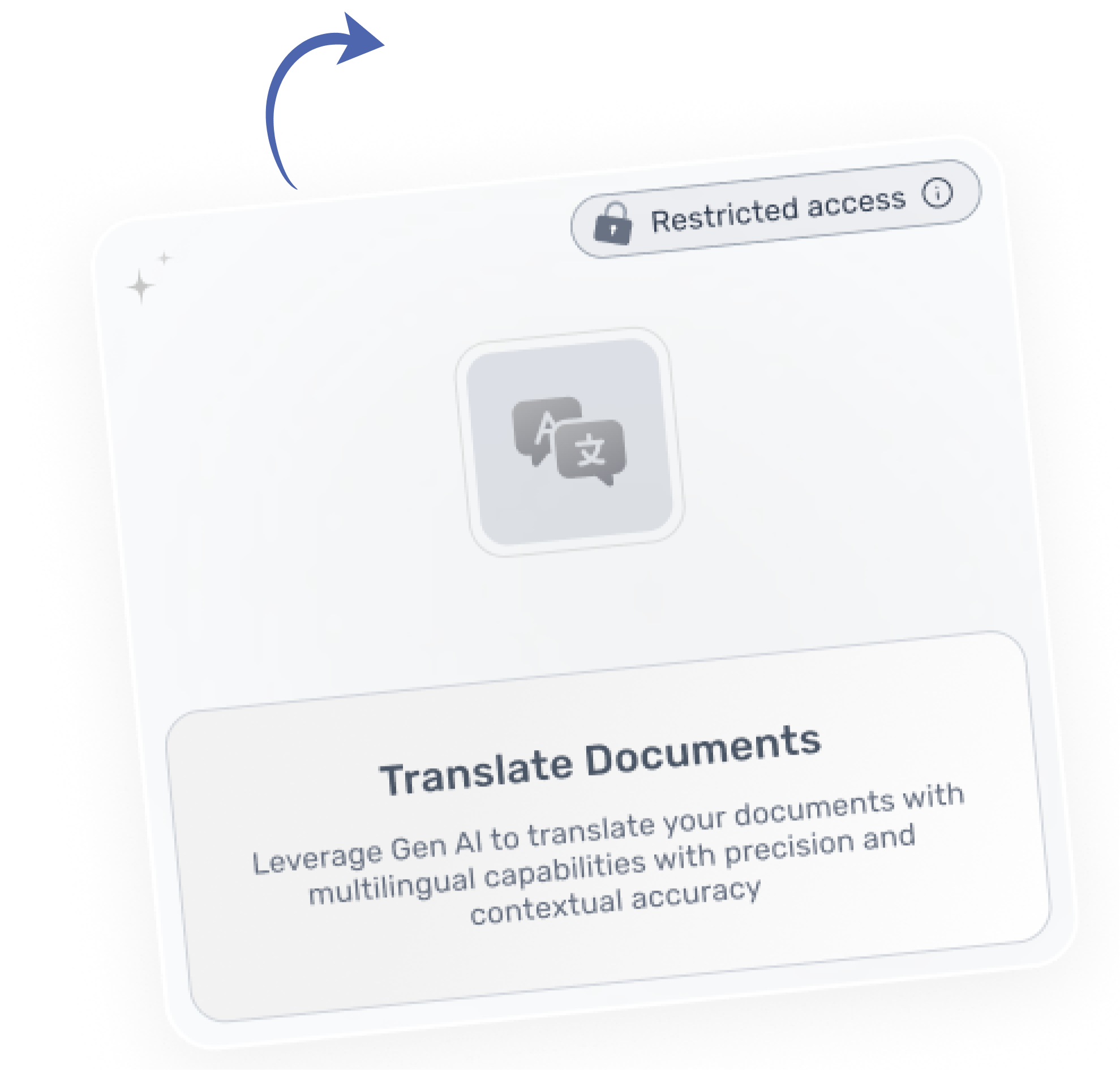
Restricted modules are intentionally visible but disabled to create discoverability and awareness, encouraging departments to request access when needed.
Restricted modules are intentionally visible but disabled to create discoverability and awareness, encouraging departments to request access when needed.
Restricted modules are intentionally visible but disabled to create discoverability and awareness, encouraging departments to request access when needed.

Token information is surfaced at the entry point to build an awareness of usage, helping users make informed decisions before engaging with a module.
Token information is surfaced at the entry point to build an awareness of usage, helping users make informed decisions before engaging with a module.
Token information is surfaced at the entry point to build an awareness of usage, helping users make informed decisions before engaging with a module.
Getting Started with BRD Generation
Getting Started with BRD Generation
Transform scattered requirements into structured Business Requirement Documents in minutes.
Transform scattered requirements into structured Business Requirement Documents in minutes.
Useful for:
IT
BA
Product
PMs


The platform follows a token based system. Departments are initially provided with credits, and additional usage requires purchasing more through an admin.
The platform follows a token based system. Departments are initially provided with credits, and additional usage requires purchasing more through an admin.
The platform follows a token based system. Departments are initially provided with credits, and additional usage requires purchasing more through an admin.
Modules outside a department’s access scope are presented in a disabled state, with access provisioned through admin intervention.
Modules outside a department’s access scope are presented in a disabled state, with access provisioned through admin intervention.
Modules outside a department’s access scope are presented in a disabled state, with access provisioned through admin intervention.

The BRD module is introduced with a brief overview.
Accessible modules are highlighted with Primary Colour, while restricted ones remain disabled to indicate availability.
The BRD module is introduced with a brief overview.
Accessible modules are highlighted with Primary Colour, while restricted ones remain disabled to indicate availability.

A subtle hover interaction provides feedback that the module is clickable and ready to use.
A subtle hover interaction provides feedback that the module is clickable and ready to use.


Before user enters the module, the first step is to define a name for the BRD.
Before user enters the module, the first step is to define a name for the BRD.
Before user enters the module, the first step is to define a name for the BRD.
This step act as a starting point for the document, making it easier to organise, identify, and manage later.
This step act as a starting point for the document, making it easier to organise, identify, and manage later.



Providing Input Documents
Providing Input Documents
Users can upload relevant documents to generate the BRD such as MOMs, reference files, or competitor data.
Users can upload relevant documents to generate the BRD such as MOMs, reference files, or competitor data.
Up to 20 documents can be uploaded, ensuring flexibility while maintaining system performance.
Up to 20 documents can be uploaded, ensuring flexibility while maintaining system performance.
In the initial state, both primary and secondary actions are disabled—guiding users to first upload the required documents before proceeding.
In the initial state, both primary and secondary actions are disabled—guiding users to first upload the required documents before proceeding.
Once documents are uploaded, the interface transitions to an active state, where CTAs become enabled—clearly indicating that the user can now move forward.

I introduced a dragonfly as a visual metaphor for progress.
I introduced a dragonfly as a visual metaphor for progress.
As the user moves from one step to another, the dragonfly subtly animates flapping its wings and transitioning forward.
As the user moves from one step to another, the dragonfly subtly animates flapping its wings and transitioning forward.


Search a job profile
Search a job profile
Metrics
Metrics
12 Jan 2025 - Today
12 Jan 2025 - Today
Total documents summarised
Total documents summarised
00
00
Average processing time
Average processing time
(Minutes)
(Minutes)
00
00
Time saved
Time saved
(Minutes)
(Minutes)
00
00
Recently summarised document/s
Recently summarised document/s
View all
View all
No document/s yet
No document/s yet
Summarise your first to get started!
Summarise your first to get started!

Repository
Repository
GP
GP


Document summarisation
Document summarisation
Skip the scroll — get concise insights with Gen AI powered summaries!
Skip the scroll — get concise insights with Gen AI powered summaries!
Need help?
Need help?
Want more insights? Add more documents for AI summarization!
Want more insights? Add more documents for AI summarization!

Click to upload
Click to upload
or drag and drop
or drag and drop
You can upload up to 15 documents maximum.
You can upload up to 15 documents maximum.
The maximum file size is 100 MB.
The maximum file size is 100 MB.
9/15 documents uploaded
9/15 documents uploaded
Remove all documents
Remove all documents
Project_Requirements_Document.docx
Project_Requirements_Document.docx
10%
10%
Market_Analysis_Report.docx
Market_Analysis_Report.docx
Uploaded
Uploaded
Financial_Statement_Q4.pdf
Financial_Statement_Q4.pdf
Uploaded
Uploaded
User_Research_Findings.pdf
User_Research_Findings.pdf
Uploaded
Uploaded
Product_Specifications_Sheet.pdf
Product_Specifications_Sheet.pdf
Uploaded
Uploaded
Business_Strategy_Plan.pdf
Business_Strategy_Plan.pdf
Uploaded
Uploaded
Company_Growth_Insights.pdf
Company_Growth_Insights.pdf
Uploaded
Uploaded
Team_Meeting_Notes.pdf
Team_Meeting_Notes.pdf
Uploaded
Uploaded
Summarise documents
Summarise documents


Processing the BRD...
Processing the BRD...
Once the BRD is generated, a loading animation is introduced to communicate progress and keep users engaged
Once the BRD is generated, a loading animation is introduced to communicate progress and keep users engaged
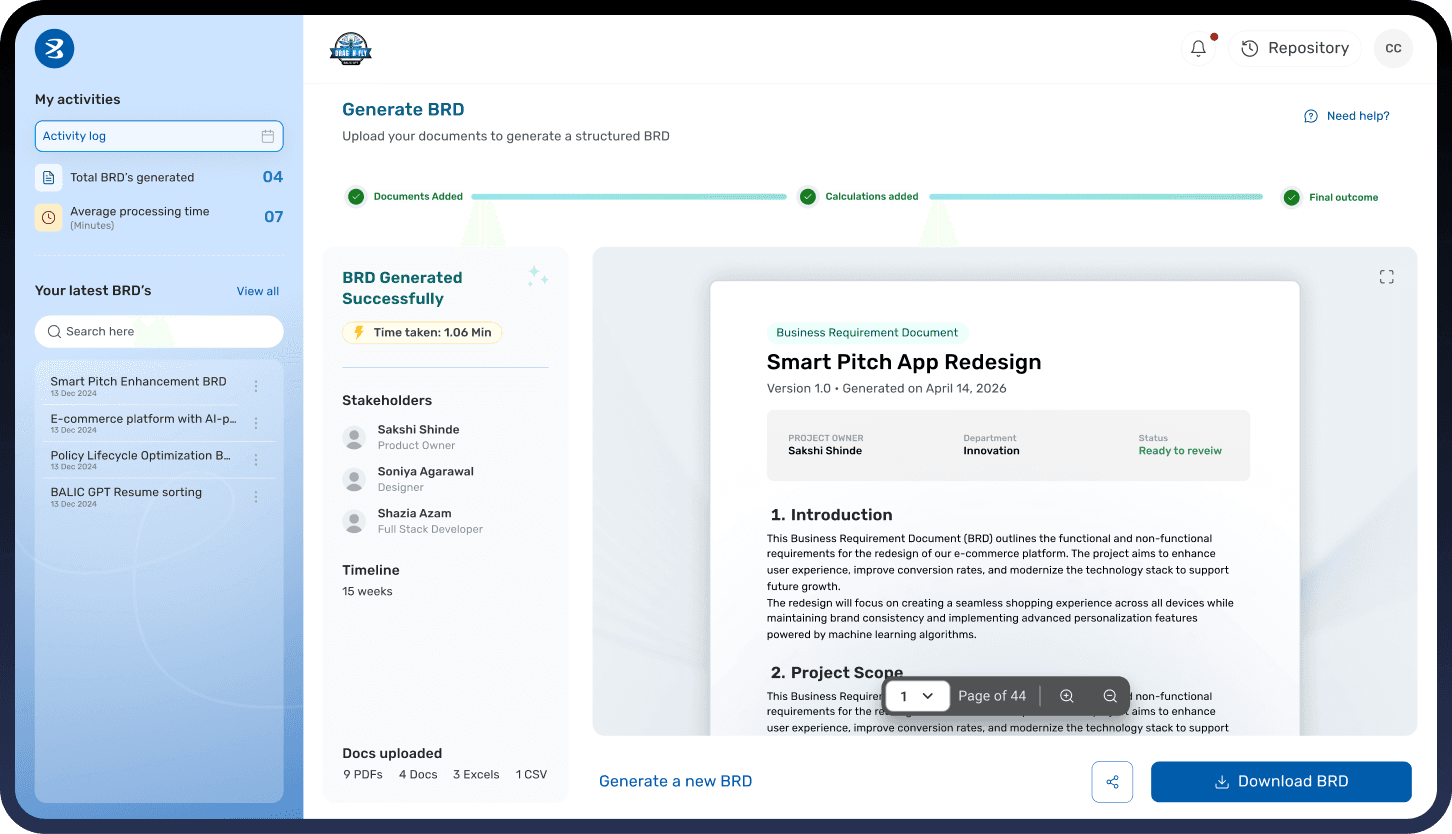
After the BRD is generated, instead of directly presenting the final output, users are first shown a structured summary of what has been successfully created and what might be missing.
This step was designed to bring transparency into the system—especially important when working with AI-generated outputs.
After the BRD is generated, instead of directly presenting the final output, users are first shown a structured summary of what has been successfully created and what might be missing.
This step was designed to bring transparency into the system—especially important when working with AI-generated outputs.
In the second step, users have the option to upload calculation files.
However, this step is not mandatory and can be skipped if the user has already provided sufficient context in the previous step.
The goal was to keep the flow flexible supporting different user needs without forcing unnecessary actions.
In the second step, users have the option to upload calculation files.
However, this step is not mandatory and can be skipped if the user has already provided sufficient context in the previous step.
The goal was to keep the flow flexible supporting different user needs without forcing unnecessary actions.

More Than Just BRD Generation
The system includes multiple other modules each designed for a specific use case across teams. Together, these modules form a flexible ecosystem that supports a wide range of workflows.
The system includes multiple other modules each designed for a specific use case across teams. Together, these modules form a flexible ecosystem that supports a wide range of workflows.

TRANSLATE DOCUMENTS
TRANSLATE DOCUMENTS
Enables quick discovery across multiple languages
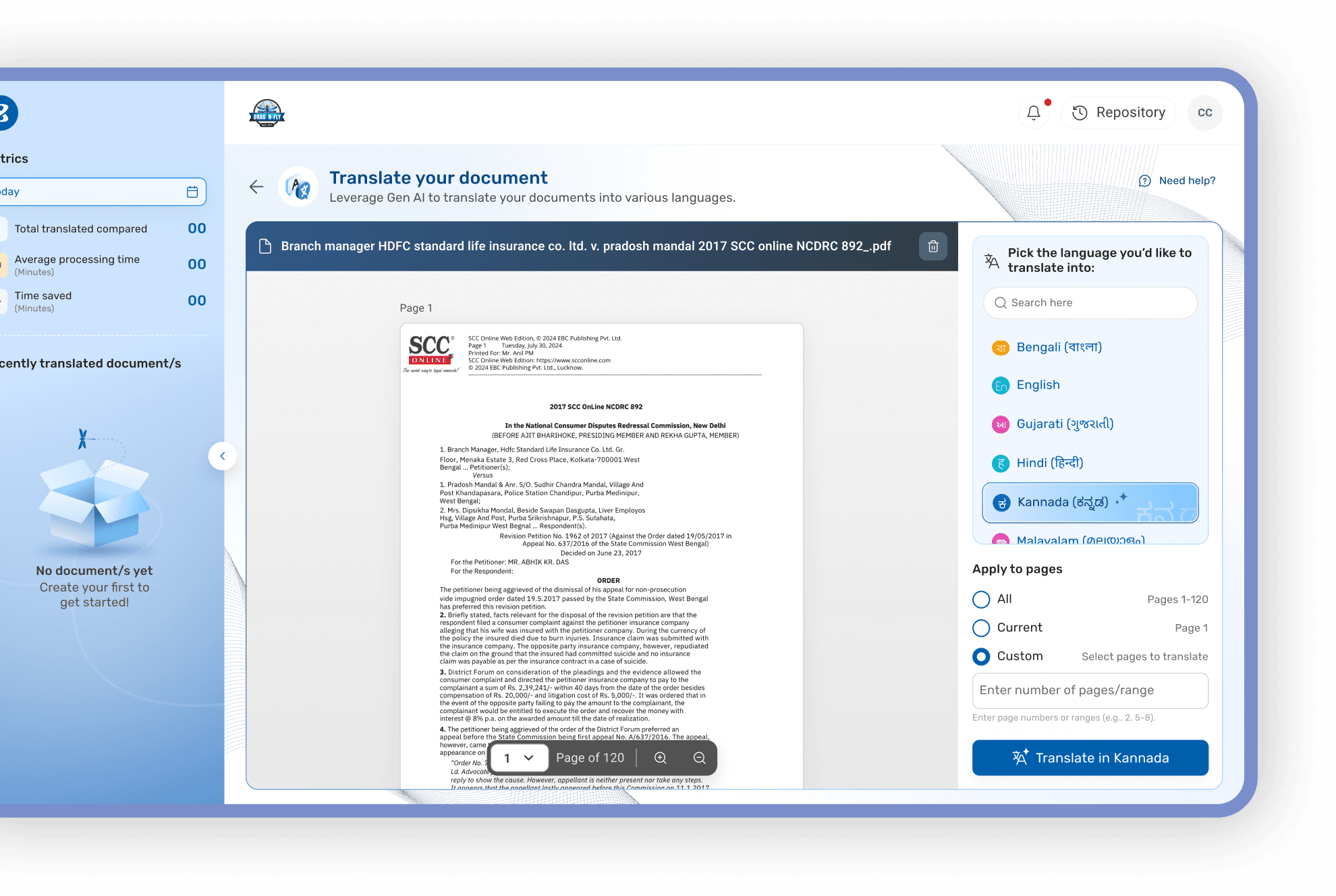
Supports full, partial, or custom page translation
Supports full, partial, or custom page translation

The interface allows users to preview the document, select the desired language, and control exactly what needs to be translated.
Once the translation is complete, the output is presented in a side-by-side format with the original document.
This allows users to quickly compare and verify the accuracy of the translation especially important for critical or sensitive documents.
Once the translation is complete, the output is presented in a side-by-side format with the original document.
This allows users to quickly compare and verify the accuracy of the translation especially important for critical or sensitive documents.
Search a job profile
Search a job profile
Search a job profile
My activities
My activities
My activities
All time activities
All time activities
All time activities
Total documents translated
Total documents translated
Total documents translated
00
00
00
Average processing time
Average processing time
Average processing time
(Minutes)
(Minutes)
(Minutes)
00
00
00
Time saved
Time saved
Time saved
(Minutes)
(Minutes)
(Minutes)
00
00
00
Recently translated document/s
Recently translated document/s
Recently translated document/s
View all
View all
View all
No documents translated yet
No documents translated yet
No documents translated yet
Create your first one to get started!
Create your first one to get started!
Create your first one to get started!

Repository
Repository
Repository
GP
GP
GP


Translate your document
Translate your document
Translate your document
Leverage Gen AI to translate your documents into various languages with precision, clarity, and contextual accuracy.
Leverage Gen AI to translate your documents into various languages with precision, clarity, and contextual accuracy.
Leverage Gen AI to translate your documents into various languages with precision, clarity, and contextual accuracy.
Need help?
Need help?
Need help?
Branch Manager HDFC Standard Life Insurance Co. Ltd. v. Pradosh Mandal 2017 SCC OnLine NCDRC 892_.pdf
Branch Manager HDFC Standard Life Insurance Co. Ltd. v. Pradosh Mandal 2017 SCC OnLine NCDRC 892_.pdf
Branch Manager HDFC Standard Life Insurance Co. Ltd. v. Pradosh Mandal 2017 SCC OnLine NCDRC 892_.pdf
Page 1
Page 1
Page 1

1
1
1
Page of 120
Page of 120
Page of 120
Pick the language you’d like to translate into:
Pick the language you’d like to translate into:
Pick the language you’d like to translate into:
Search here
Search here
Search here
आ
आ
आ
Hindi (हिन्दी)
Hindi (हिन्दी)
Hindi (हिन्दी)
আ
আ
আ
Bengali (বাংলা)
Bengali (বাংলা)
Bengali (বাংলা)
आ
आ
आ
Marathi (मराठी)
Marathi (मराठी)
Marathi (मराठी)
ஆ
ஆ
ஆ
Tamil (தமிழ்)
Tamil (தமிழ்)
Tamil (தமிழ்)
ఆ
ఆ
ఆ
Telugu (తెలుగు)
Telugu (తెలుగు)
Telugu (తెలుగు)
ஆ
ஆ
ஆ
Kannada (தமிழ்)
Kannada (தமிழ்)
Kannada (தமிழ்)
આ
આ
આ
Gujarati (ગુજરાતી)
Gujarati (ગુજરાતી)
Gujarati (ગુજરાતી)
આ
આ
આ
Gujarati (ગુજરાતી)
Gujarati (ગુજરાતી)
Gujarati (ગુજરાતી)
Apply to pages
Apply to pages
Apply to pages
All pages
All pages
All pages
Pages 1-120
Pages 1-120
Pages 1-120
Current page
Current page
Current page
Pages 1-120
Pages 1-120
Pages 1-120
Custom
Custom
Custom
43 pages selected
43 pages selected
43 pages selected
1,2,3,4,5,6,7,8,9,10,11,22,23,24,25
1,2,3,4,5,6,7,8,9,10,11,22,23,24,25
1,2,3,4,5,6,7,8,9,10,11,22,23,24,25
Translate to Hindi
Translate to Hindi
Translate to Hindi

SUMMARISE DOCUMENTS
SUMMARISE DOCUMENTS
From Documents to Insights
From Documents to Insights
Add/Remove documents
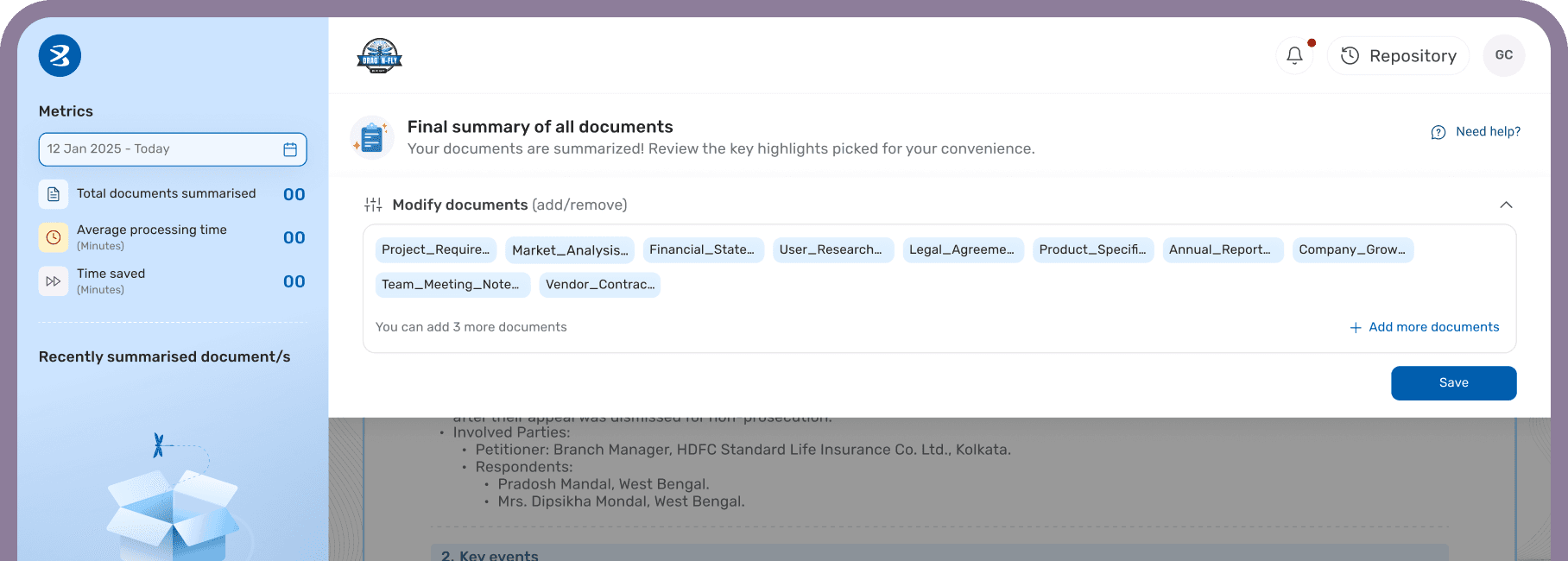
Users can modify their input documents at any point. Instead of navigating away, a drawer opens within the same context, allowing users to add or remove documents and refine the output seamlessly.
Users can modify their input documents at any point. Instead of navigating away, a drawer opens within the same context, allowing users to add or remove documents and refine the output seamlessly.
The summarisation module transforms multiple documents into structured, easy-to-scan insights, helping users quickly understand key information without reading everything.
The summarisation module transforms multiple documents into structured, easy-to-scan insights, helping users quickly understand key information without reading everything.

COMPARE DOCUMENTS
COMPARE DOCUMENTS
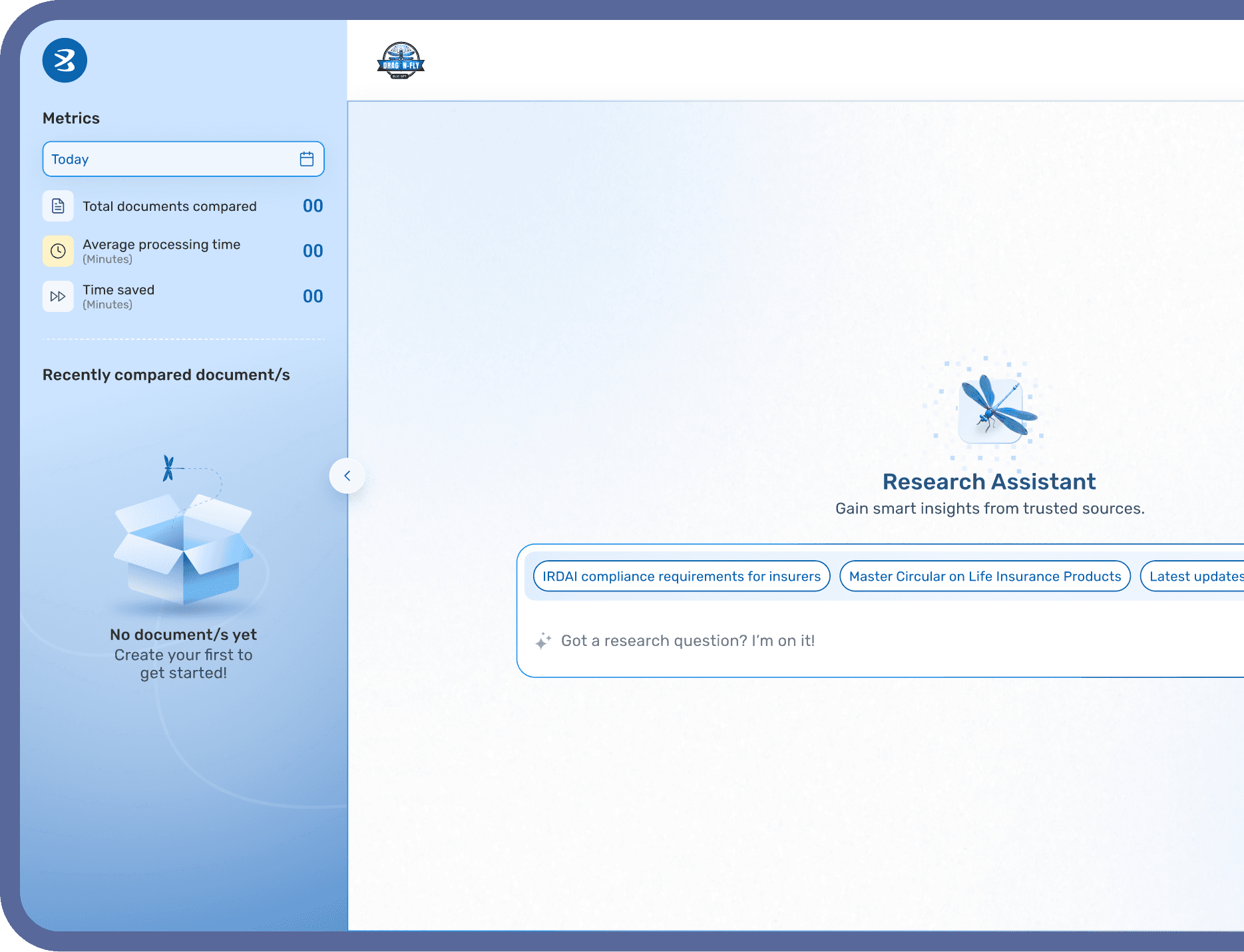
This module combines two workflows: comparing documents and extracting research insights. The experience starts by letting users clearly choose their intent.
This module combines two workflows: comparing documents and extracting research insights. The experience starts by letting users clearly choose their intent.

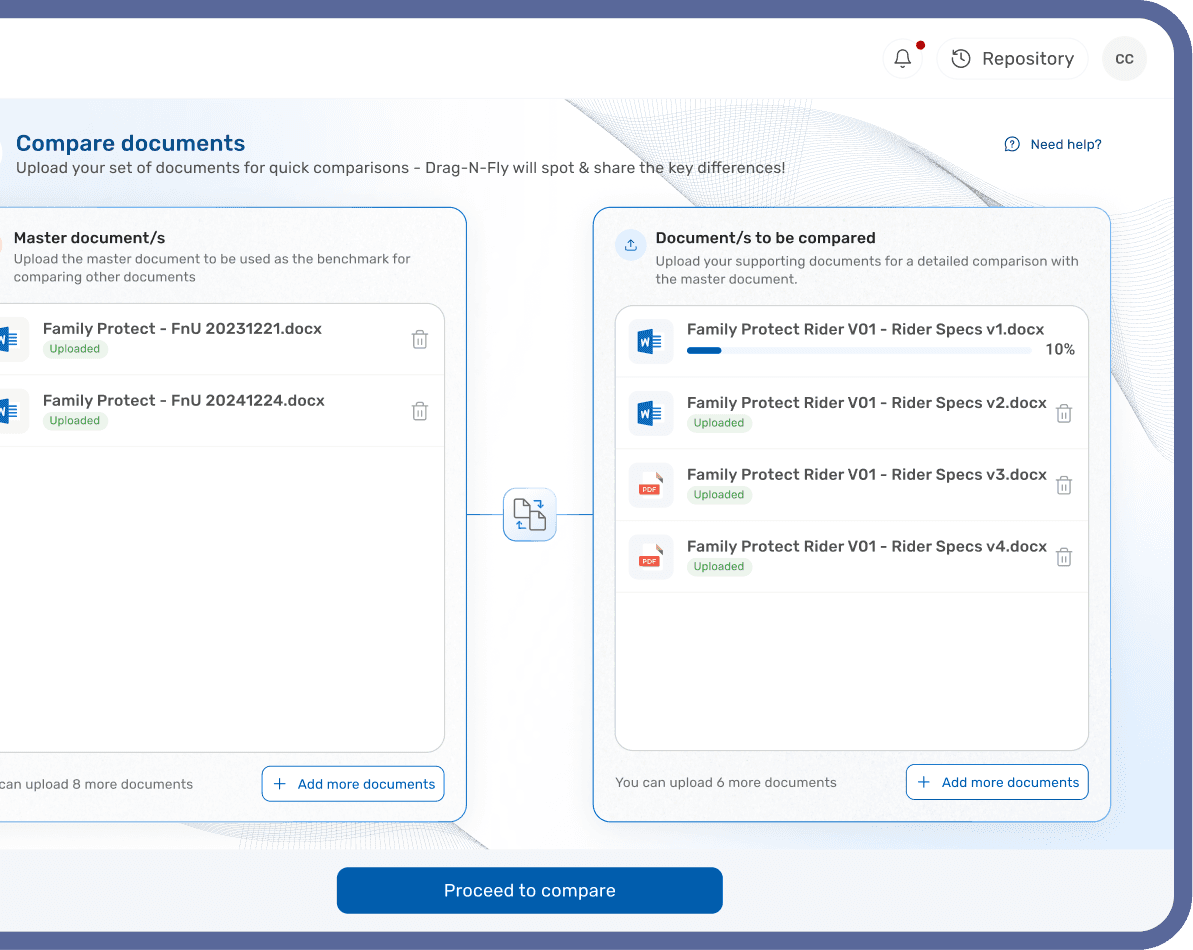
For comparison, a structured input approach is used where users define a master document and supporting files, enabling clear and accurate analysis
For comparison, a structured input approach is used where users define a master document and supporting files, enabling clear and accurate analysis
For research, the experience is simplified into a conversational interface, allowing users to quickly gain insights from trusted sources.
The Brief
Every day, employees spent valuable time creating documents, comparing files, and searching for information tasks that AI could complete in minutes. Dragonfly was built to bridge that gap by bringing powerful AI tools into one centralized platform. The challenge was not just integrating AI, but designing an experience that felt simple, reliable, and easy to adopt for everyday work across the organization.

This is just a part of a much larger system
This is just a part of a much larger system
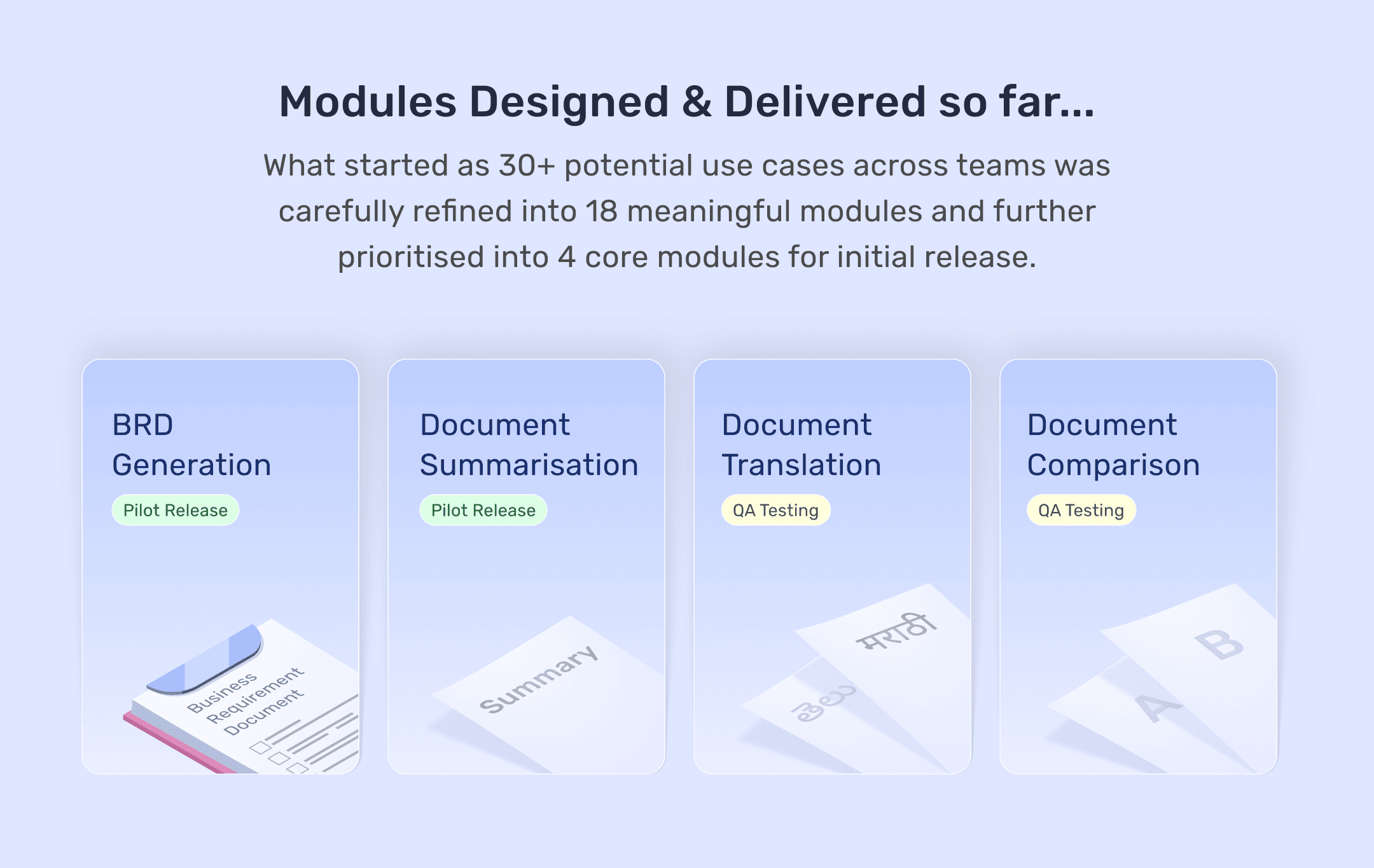
In total, around 27 use cases were identified. Out of these, 4 modules are already built and in pilot release, while several others are currently in development and design phase.
In total, around 27 use cases were identified. Out of these, 4 modules are already built and in pilot release, while several others are currently in development and design phase.
In total, around 27 use cases were identified. Out of these, 4 modules are already built and in pilot release, while several others are currently in development and design phase.
Adoption in progress
Adoption in progress
Adoption in progress
Adoption in progress
Adoption in progress

What started as a solution is gradually becoming a habit
What started as a solution is gradually becoming a habit
While the product is still in pilot, we have already seen early signs of adoption.
Teams are beginning to integrate it into their workflows, especially for document heavy tasks

Thank you!
Thank you!
Open to feedback, critique, and discussion on scaling this system further.
Open to feedback, critique, and discussion on scaling this system further.

For the best experience, switch to desktop mode
You can continue on mobile, but some layouts and details may not display optimally.