Live
Live
Full time role
Full time role
30+ screens
30+ screens
60+ days of efforts
60+ days of efforts
Smart Quote
Smart Quote
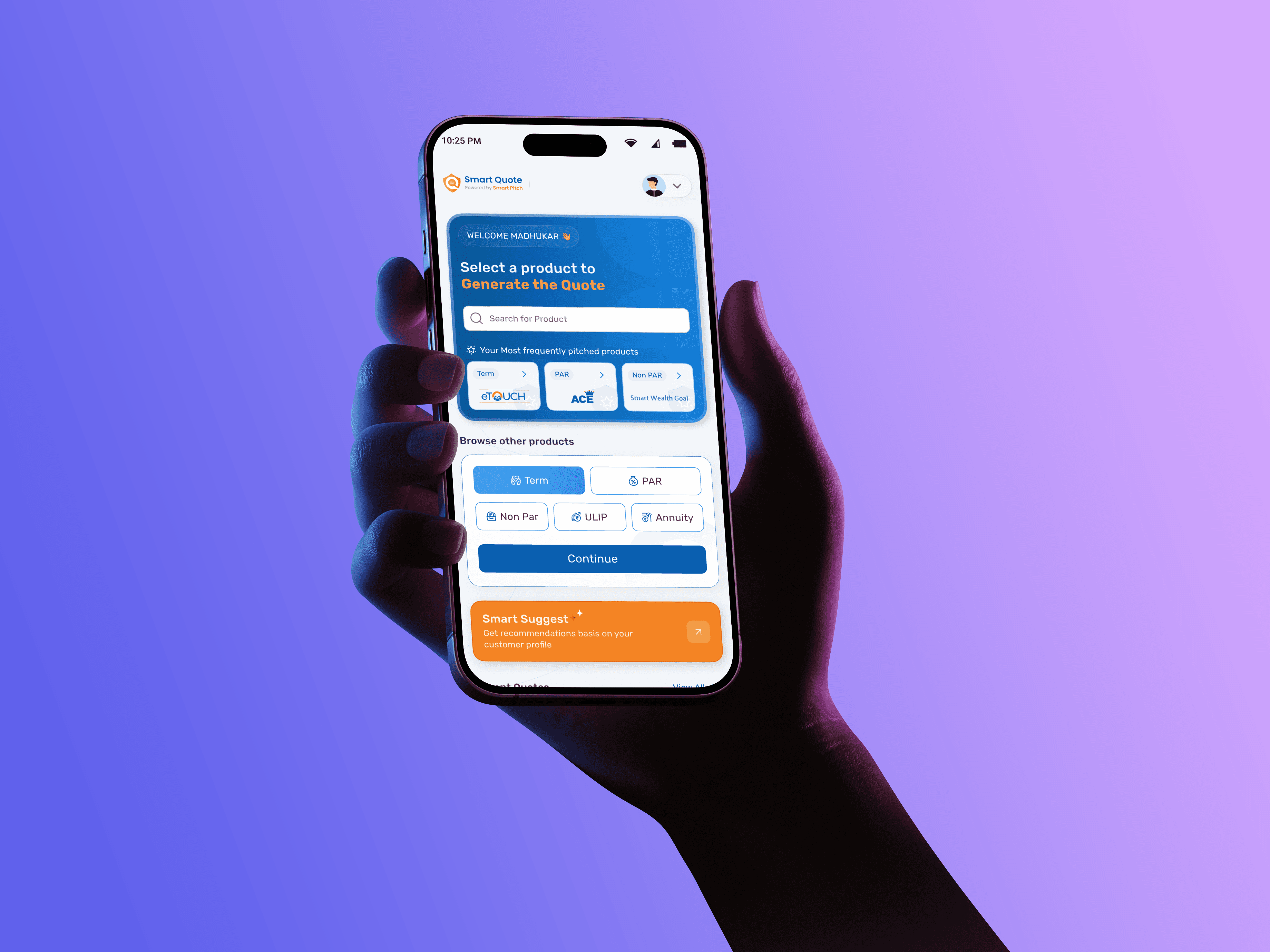
Making quote generation faster, simpler, and conversation friendly.
Making quote generation faster, simpler, and conversation friendly.
Designed to reduce friction and build confidence during live meetings.
Designed to reduce friction and build confidence during live meetings.
The Brief
The Brief
The Brief
Every insurance sale begins with a conversation, but the experience behind generating a quote felt more like filling out a lengthy form than helping someone make a financial decision. Sales advisors had to navigate a rigid, compliance-driven journey while managing customer conversations, repetitive data entry, and complex benefit illustrations all at the same time.
This project reimagined Smart Quote into a guided, conversation first experience that reduced cognitive load, streamlined quote generation, and helped advisors focus less on the system and more on the customer.
Every insurance sale begins with a conversation, but the experience behind generating a quote felt more like filling out a lengthy form than helping someone make a financial decision. Sales advisors had to navigate a rigid, compliance-driven journey while managing customer conversations, repetitive data entry, and complex benefit illustrations all at the same time.
This project reimagined Smart Quote into a guided, conversation first experience that reduced cognitive load, streamlined quote generation, and helped advisors focus less on the system and more on the customer.
Every insurance sale begins with a conversation, but the experience behind generating a quote felt more like filling out a lengthy form than helping someone make a financial decision. Sales advisors had to navigate a rigid, compliance-driven journey while managing customer conversations, repetitive data entry, and complex benefit illustrations all at the same time.
This project reimagined Smart Quote into a guided, conversation first experience that reduced cognitive load, streamlined quote generation, and helped advisors focus less on the system and more on the customer.
Every insurance sale begins with a conversation, but the experience behind generating a quote felt more like filling out a lengthy form than helping someone make a financial decision. Sales advisors had to navigate a rigid, compliance-driven journey while managing customer conversations, repetitive data entry, and complex benefit illustrations all at the same time.
This project reimagined Smart Quote into a guided, conversation first experience that reduced cognitive load, streamlined quote generation, and helped advisors focus less on the system and more on the customer.
What is Smart Quote?
What is Smart Quote?
At our organisation, sales advisors use Smart Quote to generate a Quote and Benefit Illustration (BI) of an insurance policy during client (Lead) meetings.
At our organisation, sales advisors use Smart Quote to generate a Quote and Benefit Illustration (BI) of an insurance policy during client (Lead) meetings.
At our organisation, sales advisors use Smart Quote to generate a Quote and Benefit Illustration (BI) of an insurance policy during client (Lead) meetings.
At our organisation, sales advisors use Smart Quote to generate a Quote and Benefit Illustration (BI) of an insurance policy during client (Lead) meetings.
Madhukar Rao
Sales advisor

Quote is nothing but the financial snapshot of a policy, including premium, sum assured, and benefits and benefit Illustration (BI) is the visual breakdown of how these numbers work across the policy term.
Quote is nothing but the financial snapshot of a policy, including premium, sum assured, and benefits and benefit Illustration (BI) is the visual breakdown of how these numbers work across the policy term.
Kapil Das
Client
Madhukar Rao
Sales advisor
Madhukar Rao
Sales advisor

Financial Need Analysis (Old tool) is
Embarrassing, Frustrating and Distracting.
The tool was increasing cognitive load instead of reducing it.
"Imagine sitting in front of a client and typing numbers into a rigid form…and then getting nothing for few minutes and then error message comes"
Madhukar Rao
Sales Advisor

The flow of Madhukar (Sales advisor) sounds simple
Fill client details
Fill client details
Fill client details

Generate quote & BI
Generate quote & BI
Generate quote & BI

Explain Policy
Explain Policy
Explain Policy

Close
Close
Close
But......In reality
Old app flow had, following issues
Cognitive Overload During Live Meetings
Cognitive Overload During Live Meetings
A dense, multi-section form demanded full attention, disrupting natural sales conversations.
A dense, multi-section form demanded full attention, disrupting natural sales conversations.
Rigid, All-at-Once Data Entry Model
Rigid, All-at-Once Data Entry Model
Users were required to complete extensive mandatory fields before seeing any meaningful output.
Users were required to complete extensive mandatory fields before seeing any meaningful output.
Delayed and Unclear Error Handling
Delayed and Unclear Error Handling
Validation errors appeared late, creating frustration and breaking advisor confidence mid-meeting
Validation errors appeared late, creating frustration and breaking advisor confidence mid-meeting
Output Designed for Compliance, Not Persuasion
Output Designed for Compliance, Not Persuasion
Advisors content lacked a compelling narrative. Instead of helping them persuade customers, it often felt like reading policy documentation.
Advisors content lacked a compelling narrative. Instead of helping them persuade customers, it often felt like reading policy documentation.


After stakeholder discussions and behavioural data (of both clients and advisors) from PMs, a few things became clear

Madhukar Rao
Sales Advisor
Imagine sitting in front of a client and typing numbers into a rigid form…and then getting nothing for few minutes and then error message comes
Imagine sitting in front of a client and typing numbers into a rigid form…and then getting nothing for few minutes and then error message comes
”
”
”
”
Financial Need Analysis (Old tool) is
Embarrassing, Frustrating and Distracting.
Embarrassing, Frustrating and Distracting.
Embarrassing, Frustrating and Distracting.
The tool was increasing cognitive load instead of reducing it.
The tool was increasing cognitive load instead of reducing it.
The tool was increasing cognitive load instead of reducing it.
Sales meetings need speed + confidence
Sales meetings need speed + confidence
After stakeholder discussions and behavioural data (of both clients and advisors) from PMs, a few things became clear
After stakeholder discussions and behavioural data (of both clients and advisors) from PMs, a few things became clear
After stakeholder discussions and behavioural data (of both clients and advisors) from PMs, a few things became clear

Advisors don’t need all details upfront
Advisors don’t need all details upfront
Most fields had predictable defaults
Most fields had predictable defaults
Gaurav C
Smart Quote: a redesigned experience built to support speed, clarity, and confidence during client discussions.
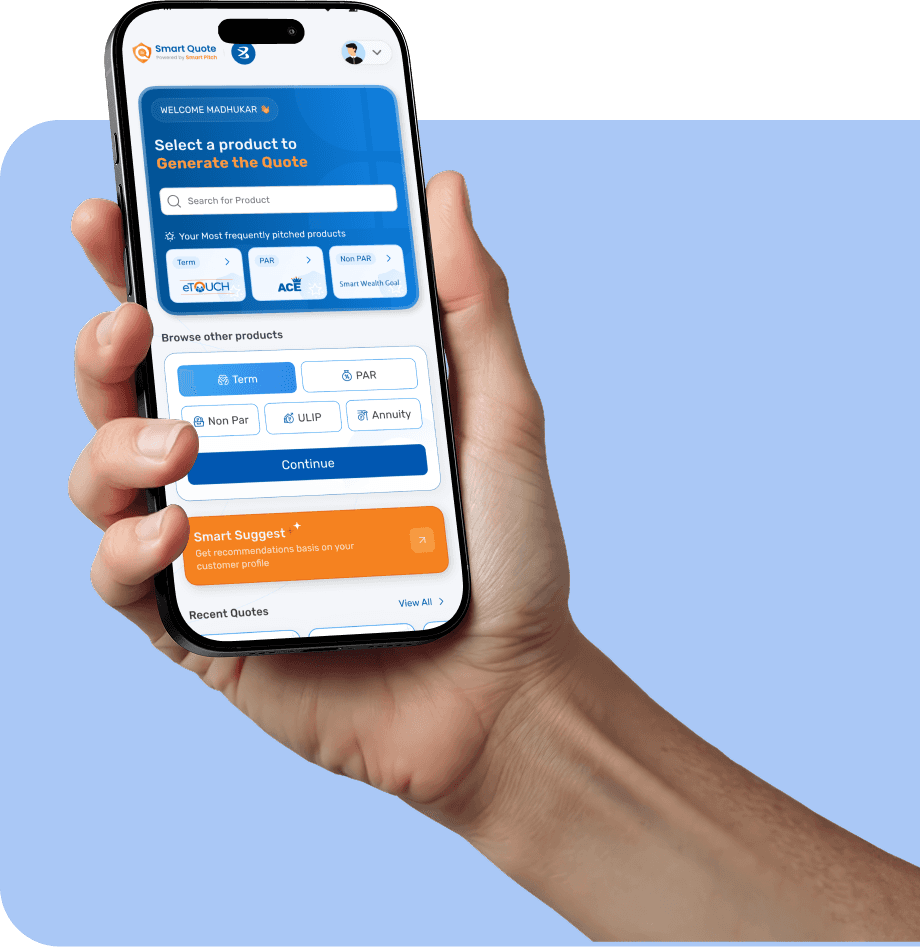
Smart Quote: a redesigned experience built to support speed, clarity, and confidence during client discussions.
Smart Quote: a redesigned experience built to support speed, clarity, and confidence during client discussions.
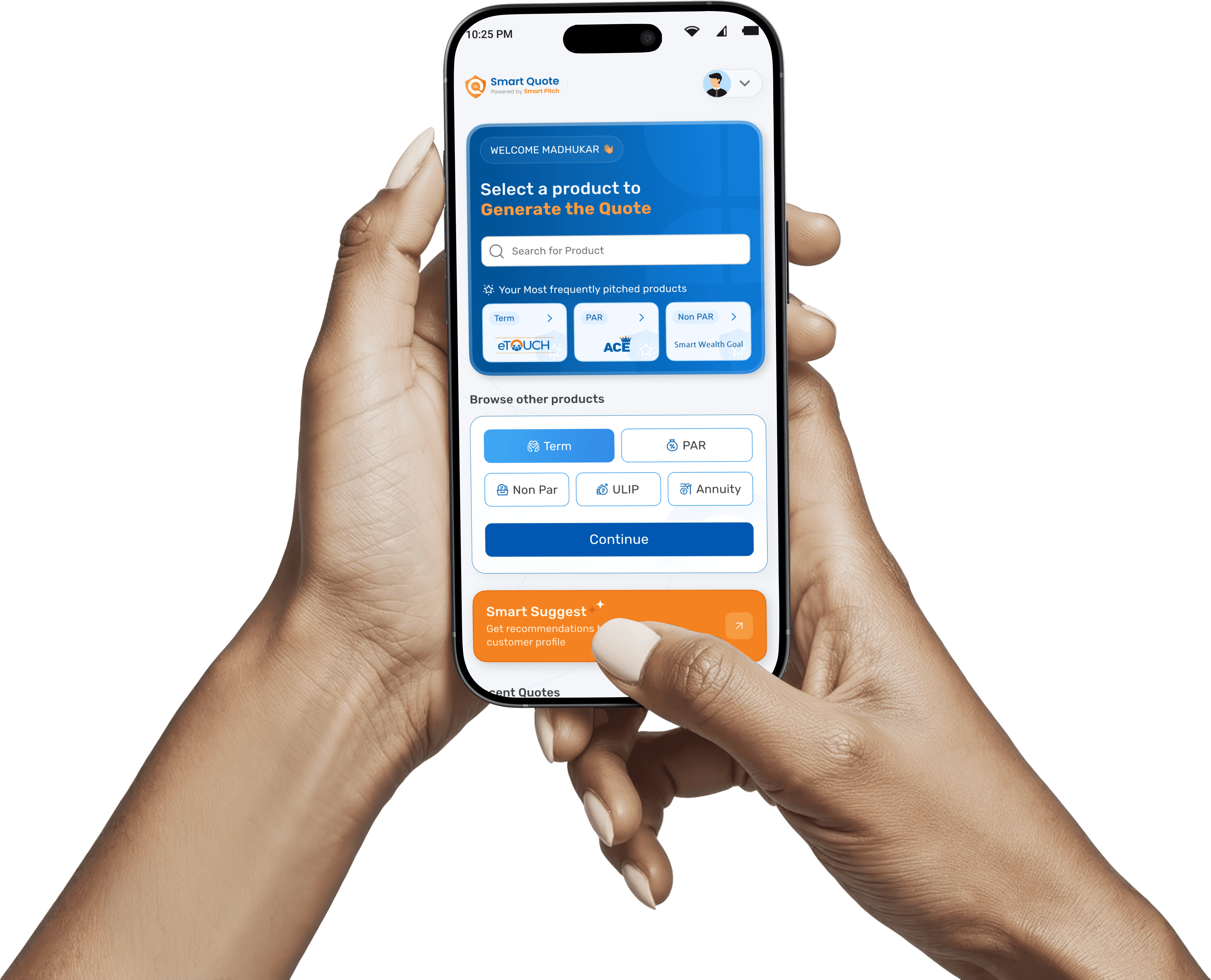
Home screen:
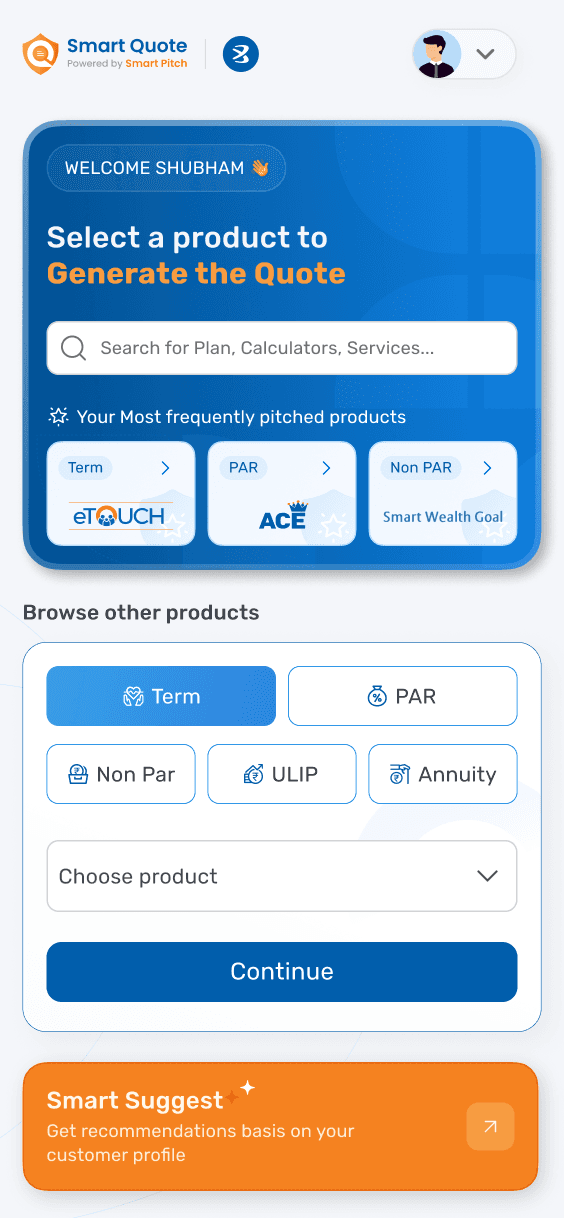
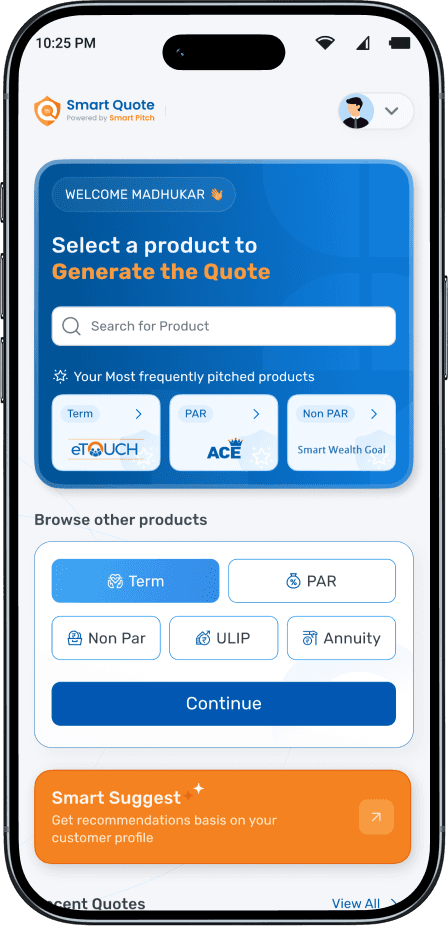
This screen is designed to keep things moving. By showing the most frequently pitched products at the top, advisors can quickly select what they usually sell without wasting time searching especially during live client meetings.
At the same time, advisor can browse through products
Smart Quote: a redesigned experience built to support speed, clarity, and confidence during client discussions.
Home screen:
This screen is designed to keep things moving. By showing the most frequently pitched products at the top, advisors can quickly select what they usually sell without wasting time searching especially during live client meetings.
At the same time, advisor can browse through products
Instead of filling everything correctly before proceeding, I shifted to: Start simple & Refine later.
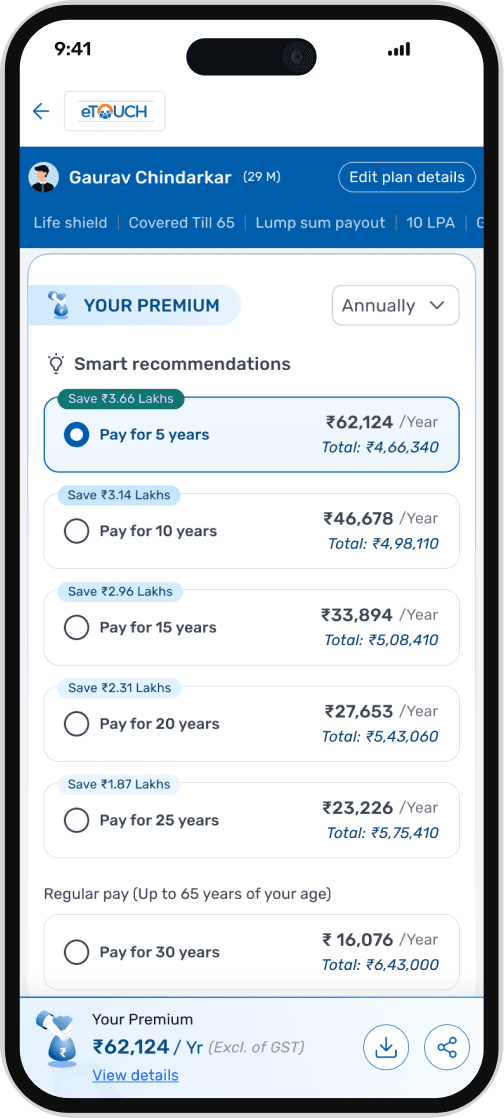
This is where the quote becomes actionable!
Premium options are displayed intelligently across different payment terms, clearly showing annual premium, total payout, and highlighted savings.
The structured layout makes comparison intuitive, enabling advisors to confidently recommend the most value-driven option during the discussion.
FILL THE FORM
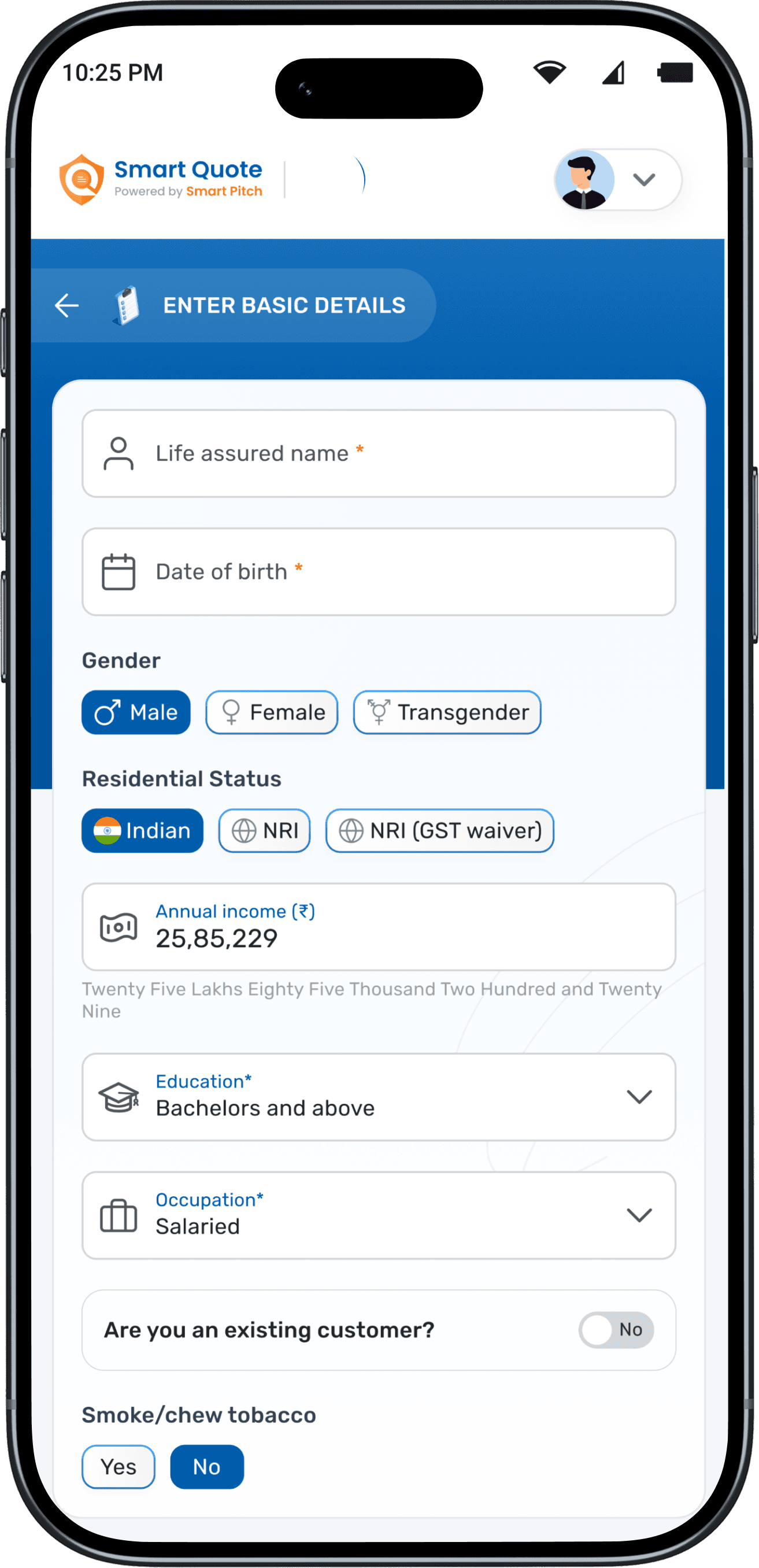
A few fields are intelligently pre-filled based on real user data shared by the PM team.
For example, around 90% of users select non-smoker, over 60% fall under salaried occupation, and a majority are male. These defaults are applied to reduce effort and speed up quote generation.

Policy details such as PT, PPT, payout, and variant are pre-selected based on available data.
The quote is generated using accurate personal details, while policy parameters are intelligently assumed, but adjustable.
Simply enter the correct Sum Assured amount, select riders (if any), apply applicable discounts, and you’re all set. Just review and update the premium.
"Now I want just 10 inputs…!"

Share Benefit Illustration
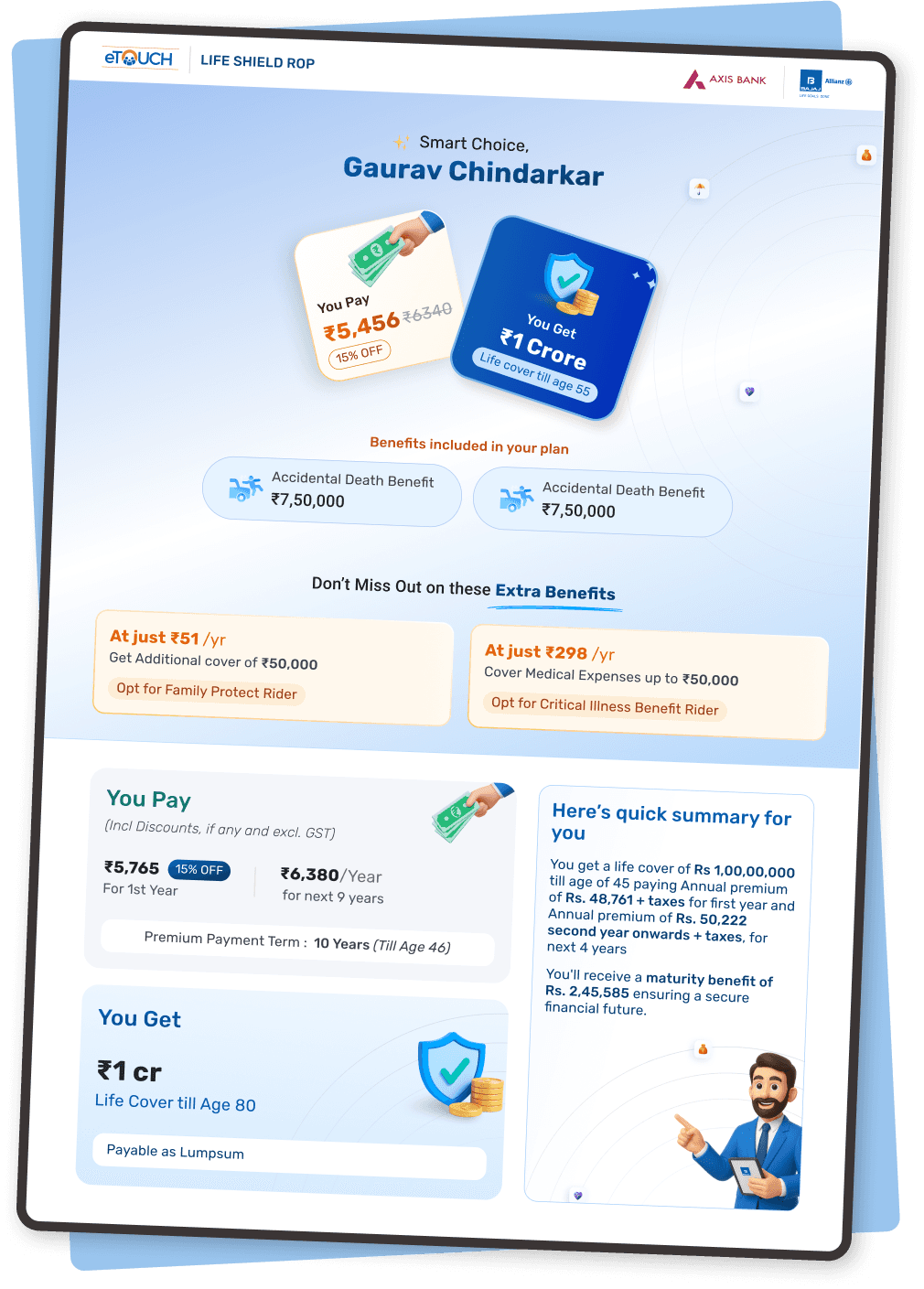
A contextual bottom sheet allows advisors to choose what they want to share One-Page or Detailed BI.
Premium details and rider configuration are handled through contextual bottom sheets to maintain continuity. Advisors can review premium breakdowns and apply riders without navigating away from the quote screen.

One pager BI (Benefit Illustration)
Instead of filling everything correctly before proceeding, I shifted to: Start simple & Refine later.
Instead of filling everything correctly before proceeding, I shifted to: Start simple & Refine later.
This is where the quote becomes actionable!
Premium options are displayed intelligently across different payment terms, clearly showing annual premium, total payout, and highlighted savings.
The structured layout makes comparison intuitive, enabling advisors to confidently recommend the most value-driven option during the discussion.
FILL THE FORM
A few fields are intelligently pre-filled based on real user data shared by the PM team.
For example, around 90% of users select non-smoker, over 60% fall under salaried occupation, and a majority are male. These defaults are applied to reduce effort and speed up quote generation.
Policy details such as PT, PPT, payout, and variant are pre-selected based on available data.
The quote is generated using accurate personal details, while policy parameters are intelligently assumed, but adjustable.
Simply enter the correct Sum Assured amount, select riders (if any), apply applicable discounts, and you’re all set. Just review and update the premium.
Share Benefit Illustration
A contextual bottom sheet allows advisors to choose what they want to share One-Page or Detailed BI.
Premium details and rider configuration are handled through contextual bottom sheets to maintain continuity. Advisors can review premium breakdowns and apply riders without navigating away from the quote screen.
Premium details and rider configuration are handled through contextual bottom sheets to maintain continuity. Advisors can review premium breakdowns and apply riders without navigating away from the quote screen.
One pager BI (Benefit Illustration)
"Now I want just 10 inputs…!"
"Now I want just 10 inputs…!"
From Friction


To Flow


The existing (Previous) experience not only slowed down the pitching process but also affected advisor’s confidence during live conversations.
The redesign focused on simplifying interactions, reducing cognitive load, and aligning the flow with how advisors naturally operate in real-world scenarios.
The existing (Previous) experience not only slowed down the pitching process but also affected advisor’s confidence during live conversations.
The redesign focused on simplifying interactions, reducing cognitive load, and aligning the flow with how advisors naturally operate in real-world scenarios.
What Changed
What Changed
Streamlined the overall experience by reducing unnecessary inputs and structuring the flow in a more guided and intuitive manner.
Streamlined the overall experience by reducing unnecessary inputs and structuring the flow in a more guided and intuitive manner.
Streamlined the overall experience by reducing unnecessary inputs and structuring the flow in a more guided and intuitive manner.
Error-prone interactions were reworked to proactively guide users, minimizing the chances of mistakes and reducing anxiety while filling forms.
Error-prone interactions were reworked to proactively guide users, minimizing the chances of mistakes and reducing anxiety while filling forms.
Error-prone interactions were reworked to proactively guide users, minimizing the chances of mistakes and reducing anxiety while filling forms.
The journey was also optimised for speed. Advisors can now generate quotes quickly without breaking the flow of their conversation, making the experience feel seamless during live client interactions.
The journey was also optimised for speed. Advisors can now generate quotes quickly without breaking the flow of their conversation, making the experience feel seamless during live client interactions.
The journey was also optimised for speed. Advisors can now generate quotes quickly without breaking the flow of their conversation, making the experience feel seamless during live client interactions.
The entire experience was designed around real meeting scenarios—where time is limited, attention is divided, and clarity is critical.
The entire experience was designed around real meeting scenarios—where time is limited, attention is divided, and clarity is critical.
The entire experience was designed around real meeting scenarios—where time is limited, attention is divided, and clarity is critical.
"As a result of these improvements, quote generation became significantly faster and more efficient, especially in live discussion settings."
"There was a noticeable reduction in drop-offs across the journey, as users were able to complete tasks with fewer interruptions and less confusion."
"Advisors reported higher confidence while using the platform. With fewer errors and a smoother flow, they were able to focus more on the conversation rather than the interface."
"Overall, the product shifted from being a supporting tool to becoming an active enabler helping advisors stay in control, maintain momentum, and deliver a better client experience."
OUTCOMES
Understanding the value of Smart Quote from the people who use it every day.

OUTCOMES
Understanding the value of Smart Quote from the people who use it every day.
"There was a noticeable reduction in drop-offs across the journey, as users were able to complete tasks with fewer interruptions and less confusion."
"Overall, the product shifted from being a supporting tool to becoming an active enabler helping advisors stay in control, maintain momentum, and deliver a better client experience."
"As a result of these improvements, quote generation became significantly faster and more efficient, especially in live discussion settings."
"Advisors reported higher confidence while using the platform. With fewer errors and a smoother flow, they were able to focus more on the conversation rather than the interface."
"As a result of these improvements, quote generation became significantly faster and more efficient, especially in live discussion settings."
"As a result of these improvements, quote generation became significantly faster and more efficient, especially in live discussion settings."
"There was a noticeable reduction in drop-offs across the journey, as users were able to complete tasks with fewer interruptions and less confusion."
"There was a noticeable reduction in drop-offs across the journey, as users were able to complete tasks with fewer interruptions and less confusion."
"Advisors reported higher confidence while using the platform. With fewer errors and a smoother flow, they were able to focus more on the conversation rather than the interface."
"Advisors reported higher confidence while using the platform. With fewer errors and a smoother flow, they were able to focus more on the conversation rather than the interface."
"Overall, the product shifted from being a supporting tool to becoming an active enabler helping advisors stay in control, maintain momentum, and deliver a better client experience."
"Overall, the product shifted from being a supporting tool to becoming an active enabler helping advisors stay in control, maintain momentum, and deliver a better client experience."
OUTCOMES
Understanding the value of Smart Quote from the people who use it every day.

Thank you!
Thank you!
Open to feedback, critique, and discussion on scaling this system further.
Open to feedback, critique, and discussion on scaling this system further.